
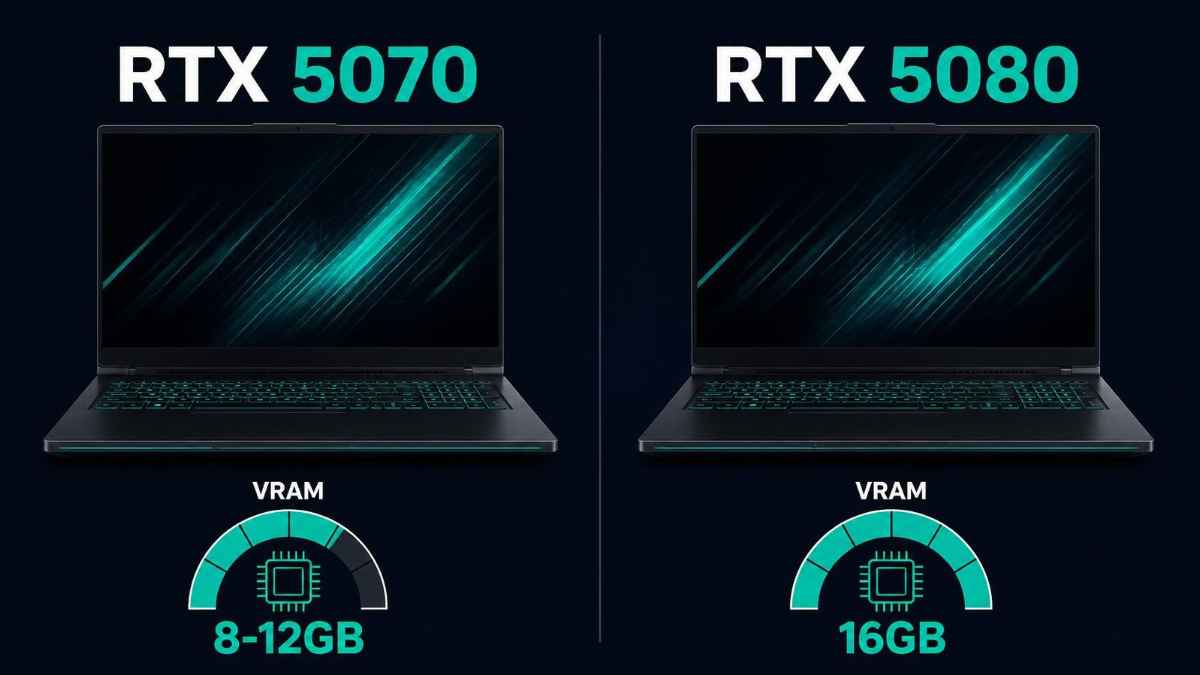
The RTX 5080 laptop GPU is the better choice for machine learning work, mainly because of its fixed 16GB of VRAM against the RTX 5070’s 8GB or 12GB options, plus 67 percent more CUDA cores and roughly 67 percent higher AI TOPS. The RTX 5070 is still a capable machine learning laptop GPU for smaller models, standard computer vision work, and inference on models under 10B parameters, especially in its 12GB configuration. Choose the RTX 5080 if you train models, fine-tune anything above 8B parameters locally, or work with large batch sizes; choose the RTX 5070 if your budget is tighter and your workloads stay modest.
Why This Matters
Picking between two laptop GPUs in the same generation sounds like a minor decision, but for machine learning work the gap between them determines which models you can actually load, not just how fast they run. A researcher fine-tuning a local language model, a student training computer vision models for a class project, or a developer prototyping before moving to cloud compute all hit the same wall eventually: VRAM capacity, not raw clock speed, decides whether a workload runs at all.
By the end of this article you will know exactly how the RTX 5070 and RTX 5080 laptop GPUs differ in VRAM, CUDA core count, AI throughput, and power draw, which one fits which kind of machine learning workload, and the mistakes people make when they pick based on gaming benchmarks instead of the specs that actually matter for training and inference.
What Is the Core Difference Between RTX 5070 and RTX 5080 Laptop GPUs?
The RTX 5080 laptop GPU has significantly more VRAM, CUDA cores, and AI throughput than the RTX 5070, since it uses a larger Blackwell die with more silicon dedicated to parallel computation. Both share the same generation of Tensor Cores and the same software stack, but the 5080 has more of everything that matters for machine learning.
The RTX 5070 laptop GPU uses NVIDIA’s GB206 chip with 4,608 CUDA cores and either 8GB or a newer 12GB GDDR7 configuration on a 128-bit memory bus, rated at 798 AI TOPS. The RTX 5080 laptop GPU steps up to the larger GB203 chip with 7,680 CUDA cores and a fixed 16GB of GDDR7 on a wider 256-bit bus, rated at 1,334 AI TOPS. Both chips use the same fifth-generation Tensor Cores with support for FP16, BF16, INT8, FP8, and FP4 precision, which matters for running quantized models efficiently on either card. The practical difference is not features, since both support the same precision formats and software, but raw capacity: more VRAM to hold larger models and more cores to process them faster.
Specification comparison:
- CUDA cores: RTX 5070 has 4,608, RTX 5080 has 7,680, a difference of roughly 67 percent
- VRAM: RTX 5070 offers 8GB or 12GB depending on configuration, RTX 5080 is fixed at 16GB
- Memory bus: RTX 5070 uses a 128-bit bus, RTX 5080 uses a wider 256-bit bus
- AI throughput: RTX 5070 rated at 798 TOPS, RTX 5080 rated at 1,334 TOPS
- TGP range: RTX 5070 runs 35 to 100W (up to 115W with Dynamic Boost), RTX 5080 runs 80 to 150W
How Much VRAM Do You Need for Machine Learning, and Which One Has Enough?
VRAM is the single most important spec for machine learning on either of these GPUs, since a model’s weights and activations both have to fit inside it during training or inference. For most local language models and moderate computer vision datasets, 16GB gives noticeably more headroom than 8GB, and even the 12GB RTX 5070 variant sits closer to the 5080 than to the base 8GB model.
At 4-bit quantization, an 8B parameter local language model needs roughly 5 to 6GB of VRAM plus 20 to 30 percent overhead for context and runtime, which fits comfortably on a 12GB RTX 5070 but leaves little room on the 8GB variant once you add a larger context window or run other applications alongside it. A 13B to 14B model pushes past 10GB with the same overhead, which only the 16GB RTX 5080 handles with real comfort. For traditional machine learning work like training convolutional networks or fine-tuning smaller transformer models, VRAM also determines your maximum batch size, and larger batches generally mean faster, more stable training runs.
VRAM guidance for common ML workloads:
- 8GB (base RTX 5070): small computer vision models, inference on 7B models with a short context window
- 12GB (RTX 5070 variant): comfortable inference on 7B to 8B models, moderate fine-tuning jobs, larger batch sizes than the 8GB card
- 16GB (RTX 5080): 13B to 14B local model inference, larger batch sizes for training, more headroom for multitasking during long training runs
How Do CUDA Cores and Tensor Cores Affect Training and Inference Speed?
CUDA core count directly affects how fast a GPU processes the parallel matrix operations that dominate machine learning workloads, and the RTX 5080’s 7,680 cores give it a real speed advantage over the RTX 5070’s 4,608 cores, independent of the VRAM difference. Tensor Cores handle the specialized mixed-precision math used in modern training and inference, and both GPUs share the same fifth-generation design.
The core count gap of roughly 67 percent does not translate into a flat 67 percent speed improvement in every task, since real performance also depends on memory bandwidth, clock speed, and how well a workload parallelizes. That said, the RTX 5080’s wider 256-bit memory bus feeds its larger core count more effectively than the RTX 5070’s 128-bit bus feeds its smaller one, which matters during training when the GPU is constantly moving data between VRAM and its compute units. For inference on already-loaded models, the gap narrows somewhat, since a smaller model running on the RTX 5070 is not necessarily bottlenecked the same way a training job would be.
What core count differences mean in practice:
- Training runs: the RTX 5080’s extra cores and bandwidth shorten epoch times noticeably on the same dataset and batch size
- Inference on small models: the gap is smaller, since both GPUs can serve a properly sized model at usable speed
- Fine-tuning: more cores plus more VRAM let the RTX 5080 handle larger batch sizes, which shortens fine-tuning time further
- Mixed workloads: running a model while also preprocessing data benefits more from the RTX 5080’s extra headroom
Which GPU Handles Local LLMs and Larger Datasets Better?
The RTX 5080 handles local language models and larger datasets more comfortably because its 16GB of VRAM covers a wider range of model sizes without hitting a hard ceiling, while the RTX 5070 is better suited to smaller models and lighter datasets, particularly in its base 8GB form. Both GPUs support the same FP4 and FP8 quantization formats, which helps stretch VRAM further on either card.
🖥️Also read: How to Run a Local LLM on a Laptop in 2026 (Ollama Guide)
For anyone planning to experiment with a range of open-weight local models, the practical ceiling matters more than average performance. A 12GB RTX 5070 can run most 7B to 8B models well, but stepping up to a 13B or 14B model, or running a longer context window for document analysis, pushes past what it can hold. The RTX 5080’s 16GB gives room to run those larger models directly, or to run a smaller model with a much longer context window, without immediately hitting an out-of-memory error. For larger tabular or image datasets used in traditional machine learning, the same logic applies: more VRAM means larger batches can be loaded at once, which usually means faster and more stable training.
Practical model-size guidance:
- RTX 5070 (8GB): reliable for 7B models at short context, tight for anything larger
- RTX 5070 (12GB): comfortable for 7B to 8B models, workable for light fine-tuning
- RTX 5080 (16GB): comfortable for 13B to 14B models, longer context windows, and larger training batches
- Datasets beyond either card’s comfort zone: both benefit from mixed CPU-GPU offloading or cloud compute for the largest jobs
How Does Power Draw and Cooling Affect Real-World ML Performance?
Power draw and laptop cooling design affect sustained machine learning performance as much as the GPU spec sheet does, since both the RTX 5070 and RTX 5080 are configured differently across laptop models depending on their total graphics power setting. A GPU with a higher TGP ceiling can sustain higher clock speeds during long training runs, but only if the laptop’s cooling system supports it.
The RTX 5070 laptop GPU has a TGP range of 35 to 100W, extending to 115W with Dynamic Boost enabled, while the RTX 5080 ranges from 80 to 150W. A laptop with an RTX 5080 configured near the low end of that range, in a thin chassis with limited cooling, may not outperform a well-cooled RTX 5070 configured near its own ceiling by as much as the core count difference suggests. This matters specifically for machine learning because training jobs run for extended periods, unlike a short gaming session, so sustained thermal throttling has more time to affect the final result. Checking a specific laptop model’s actual TGP configuration, not just which GPU it contains, is necessary before assuming performance based on the chip name alone.
What to check on any specific laptop:
- The GPU’s actual configured TGP, since manufacturers set this differently across chassis designs
- Whether the laptop supports Dynamic Boost or similar features that temporarily raise power limits
- Cooling design quality, since sustained training workloads run far longer than typical gaming sessions
- Battery-powered performance, since most laptop GPUs throttle significantly when unplugged
Which One Should You Buy Based on Your Budget and Workload?
Buy the RTX 5080 if your machine learning work regularly involves models above 8B parameters, larger training batches, or extended fine-tuning sessions, since its extra VRAM removes a hard ceiling the RTX 5070 will eventually hit. Buy the RTX 5070, ideally the 12GB configuration, if your budget is a real constraint and your workloads stay in the range of smaller models, standard coursework, or prototyping before moving to cloud infrastructure.
The price difference between laptops carrying these two GPUs is usually substantial, and for many students and early-career developers, an RTX 5070 laptop covers real machine learning learning and experimentation without issue. Professionals or researchers who plan to run local models as a daily tool, rather than occasionally, tend to regret the 8GB variant specifically, since VRAM ceilings show up quickly once real projects replace tutorial-sized examples. The 12GB RTX 5070 configuration narrows this gap considerably and is worth seeking out specifically if you find a laptop offering it at a reasonable premium over the 8GB version.
🖥️Also read: Best Laptops for AI Workloads in 2026: Top Picks Tested
Quick decision guide:
- Tight budget, learning and prototyping: RTX 5070, preferably the 12GB configuration
- Regular use of 7B to 8B local models: RTX 5070 12GB is sufficient for most tasks
- Fine-tuning, training, or running 13B+ models locally: RTX 5080 is the safer investment
- Planning to eventually move heavy training to cloud compute anyway: RTX 5070 is fine as a development machine
What Mistakes Do People Make When Choosing Between These Two for ML?
The most common mistake is comparing these GPUs using gaming benchmarks alone, since frame rate differences do not translate directly into training or inference speed differences. A second common mistake is buying the base 8GB RTX 5070 without checking whether a 12GB configuration exists at a similar price, since the VRAM increase matters more for machine learning than the price gap usually suggests.
A third mistake is ignoring the laptop’s actual TGP configuration and assuming the GPU name alone determines performance, when a poorly cooled RTX 5080 configured near its lower power limit can underperform expectations set by spec sheets. A fourth mistake is underestimating how quickly VRAM fills up once context length, batch size, and background applications are all running at the same time, leading to out-of-memory errors that feel like they came out of nowhere.
Mistakes to avoid:
- Comparing these GPUs using gaming FPS charts instead of VRAM capacity and training throughput
- Buying the 8GB RTX 5070 without checking for the 12GB configuration first
- Assuming the GPU name guarantees a specific performance level regardless of the laptop’s cooling and TGP setting
- Underestimating real-world VRAM usage once context length and background processes are accounted for
- Expecting either GPU to match desktop-class RTX 50 series performance, since laptop variants use fewer cores at lower power limits
FAQ
It covers small computer vision models and inference on 7B language models with a short context window, but it fills up quickly with anything larger. The 12GB configuration, where available, is a meaningfully better fit for most machine learning work.
Yes, the RTX 5070 runs 7B to 8B parameter local models well, especially in its 12GB configuration. It struggles with models above that range or with very long context windows.
The RTX 5080 has roughly 67 percent more CUDA cores and a wider memory bus, which typically translates to a noticeable but not exactly proportional speed increase during training, since bandwidth, batch size, and cooling all play a role too.
Yes, both use fifth-generation Tensor Cores supporting FP16, BF16, INT8, FP8, and FP4 precision, so quantized model support is identical between them. The difference is capacity, not feature support.
For machine learning specifically, yes. The 50 percent VRAM increase noticeably raises the ceiling on model size and batch size for a relatively small price difference in most configurations.
If your work regularly involves models above 8B parameters or extended training sessions, the extra VRAM justifies the cost even without gaming as a factor. For lighter or occasional work, the RTX 5070 is a reasonable and cheaper alternative.
Yes, particularly for machine learning, since training jobs run far longer than a typical gaming session and give thermal throttling more time to reduce sustained performance. Always check a specific laptop’s TGP configuration rather than assuming based on the GPU name alone.
Final words
For machine learning work, the RTX 5080 laptop GPU earns its higher price through VRAM capacity as much as raw speed, since 16GB removes a ceiling that the RTX 5070 will eventually hit once real projects grow past tutorial size. The RTX 5070, especially in its 12GB configuration, remains a solid choice for smaller models and tighter budgets.
Decide based on the size of models you actually plan to run, not the benchmark charts built around gaming. If local language models above 8B parameters or regular fine-tuning are part of your plan, the RTX 5080 is worth the extra cost.
Learn more about choosing an AI laptop for RAM, VRAM, GPU, NPU, and CPU →