
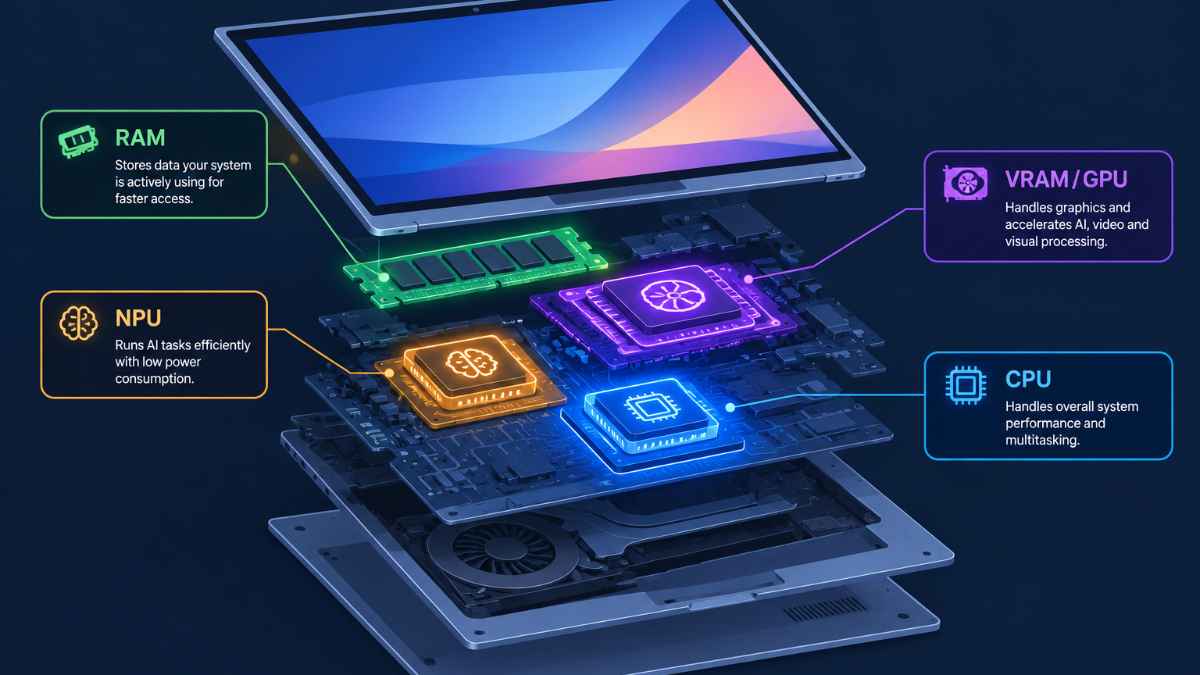
An AI laptop needs enough RAM to hold your workload, a GPU with sufficient VRAM if you run local models or generate images, an NPU rated at 40 TOPS or higher for on-device features like transcription and background effects, and a CPU that can keep everything fed with data. For most buyers in 2026, that means 32GB of RAM, a 40+ TOPS NPU for Copilot+ or Apple Neural Engine features, and a discrete GPU with at least 8GB of VRAM only if you plan to run local language models or image generation. Casual AI feature users can skip the GPU entirely and rely on the NPU and CPU instead.
Why This Matters
Every laptop sold in 2026 claims to be an “AI laptop,” but the term covers machines with wildly different capabilities. A thin ultrabook with a 40 TOPS NPU and 16GB of RAM handles live captions and background blur just fine, while a creator running local image generation or a developer testing a 32B parameter language model needs a completely different set of specs, namely a discrete GPU with real VRAM. Buying based on the “AI” sticker alone, without understanding which component does which job, is how people end up overpaying for features they never use or underbuying for the work they actually do.
By the end of this article you will know exactly what RAM, VRAM, GPU, NPU, and CPU each contribute to AI performance, how much of each you need based on your actual use case, and which mistakes lead buyers to regret their laptop within a year. The numbers below come from current 2026 hardware specifications and buying guides, not rough estimates.
🖥️Also read: Best Budget AI Laptops in 2026: Top Picks Under $1,000
What Do RAM, VRAM, GPU, NPU, and CPU Actually Do in an AI Laptop?
Each component handles a different part of an AI workload, and no single spec tells the whole story. RAM holds your active programs and data, VRAM holds a GPU’s model weights and working memory, the GPU handles heavy parallel computation like training or image generation, the NPU handles small persistent AI tasks efficiently, and the CPU coordinates everything and handles tasks that are not GPU-friendly.
A useful way to think about it: the NPU is built for low-power, always-on inference such as noise cancellation, real-time translation, and smart search, tasks that run constantly in the background without draining the battery. The GPU is the heavyweight, capable of massive parallel computation, and on discrete cards it comes with its own dedicated VRAM pool separate from system RAM. The CPU still manages data preprocessing, application logic, and any AI task that does not benefit from parallel processing. On Apple Silicon and the newest Arm-based Windows chips, the GPU and NPU can share the same unified memory pool as the CPU, which changes how much total RAM you actually need.
Key roles at a glance:
- RAM: holds the operating system, open applications, and whatever the CPU is actively working on
- VRAM: dedicated memory on a discrete GPU, used to hold model weights during local AI inference or training
- GPU: performs the parallel math behind image generation, model training, and larger local language models
- NPU: runs efficient, low-power inference for background and always-on AI features
- CPU: coordinates the system and handles tasks that do not parallelize well
How Much RAM Do You Need for AI Tasks on a Laptop?
Sixteen gigabytes is the realistic floor for a 2026 AI laptop, and 32GB is the right choice for most buyers. Anything below that limits you to light browsing and basic on-device features, not real AI work.
RAM capacity determines how many applications, browser tabs, and background processes can run at once without swapping to disk, and AI features add real memory pressure on top of normal use. A machine with 16GB can handle Copilot+ style features and small local models, but developers running local language models, virtual machines, containers, or heavy creative software will hit the ceiling quickly. Memory type matters almost as much as capacity: LPDDR5X delivers meaningfully higher bandwidth than older LPDDR4X or standard DDR5, and higher bandwidth lets the NPU and integrated GPU process AI tasks faster with the same amount of memory.
RAM guidance by use case:
- 16GB: light Copilot+ features, web browsing, office work, small local models under 3B parameters
- 32GB: the sensible default for most buyers, covers heavier multitasking and local models in the 7B to 14B range
- 64GB or more: AI developers, researchers, and anyone running larger local models or long data pipelines as a primary workflow
- Soldered RAM laptops: buy the maximum configuration at purchase, since you cannot upgrade later
How Much VRAM and What GPU Do You Need?
You need a discrete GPU with at least 8GB of VRAM only if you plan to run local AI models, train anything, or generate images regularly, and casual AI feature use does not require one at all. VRAM is the hard limit on how large a model you can run at reasonable speed.
A model’s weights have to fit inside the GPU’s VRAM to run efficiently, and the math is fairly predictable: an 8B parameter model at 4-bit quantization needs roughly 5 to 6GB plus 20 to 30 percent overhead for context, while a 70B model at the same quantization needs somewhere around 38 to 45GB. An 8GB card, such as an entry-level RTX 4060 or 4070 laptop GPU, comfortably covers 7B to 8B local models and common computer vision tasks. Stepping up to 16GB or more opens the door to 13B to 32B models and more demanding image generation work. Apple’s unified memory architecture changes this equation entirely, since the GPU draws from the same pool as system RAM rather than a separate VRAM allocation, which is why a MacBook Pro with 48GB or more of unified memory can run larger models than an 8GB discrete card ever could.
🖥️Also read: How Much VRAM Do You Need for AI Workloads in 2026?
VRAM guidance by workload:
- 8GB VRAM: entry-level local models (7B to 8B), common computer vision models, light fine-tuning
- 12 to 16GB VRAM: 13B to 27B local models, more demanding image generation
- 24GB+ VRAM: 32B-class local models, serious training work, an RTX 4090 or 5090-class card
- Apple unified memory (48GB to 96GB+): large local models on a thin and light chassis, no separate VRAM bottleneck
What Is an NPU and How Many TOPS Do You Need?
An NPU is a dedicated chip built specifically for efficient neural network inference, and 40 TOPS is the current minimum to qualify for Microsoft’s Copilot+ PC certification. TOPS stands for trillion operations per second, and it measures raw NPU throughput, not overall AI capability.
The NPU exists to run AI features continuously without draining the battery the way a CPU or GPU would. Background blur on a video call, real-time translation, live captions, and on-device search all lean on the NPU rather than the GPU, which is why Copilot+ PCs feel noticeably more efficient at these tasks than older laptops running the same features through software. As of 2026, Intel’s Core Ultra Series 3 chips, AMD’s Ryzen AI 300 and 400 series, and Qualcomm’s Snapdragon X2 Elite all clear the 40 TOPS threshold, with Snapdragon’s NPU rated near 80 TOPS in its newest generation. Apple does not use the TOPS metric in the same marketing terms, but its Neural Engine performs a comparable role across Photos, Final Cut Pro, and third-party apps. A higher TOPS number is not a complete benchmark on its own, since memory bandwidth, software optimization, and the specific application all affect real-world results.
🖥️Also read: What Is an NPU and Does It Help with AI Workloads?
What to check before buying on NPU specs:
- 40 TOPS is the floor for Copilot+ certification on Windows laptops
- 50 TOPS or higher gives more headroom as software demands grow, including rumored future Windows requirements
- Apple’s Neural Engine handles the equivalent role on Mac hardware without a published TOPS figure
- TOPS alone does not predict battery life, thermal behavior, or whether your specific apps even use the NPU
- A laptop advertised as “AI” without a stated NPU spec is a marketing claim, not a meaningful hardware feature
Which CPU Is Best for an AI Laptop?
The best CPU for an AI laptop is a recent Intel Core Ultra, AMD Ryzen AI, Qualcomm Snapdragon X2, or Apple M-series chip with strong single-core and multi-core performance, since the CPU still handles data preprocessing and any task that does not run well on a GPU or NPU. Core count and clock speed both matter for parallel data handling.
Intel’s Core Ultra Series 3 (“Panther Lake”) and AMD’s Ryzen AI 300 and 400 series both pair a modern CPU with an integrated NPU and GPU on the same package, which is the standard configuration for most 2026 AI laptops. Qualcomm’s Snapdragon X2 Elite takes a different approach with an Arm-based chip that shares memory between CPU, GPU, and NPU, trading some software compatibility for strong battery life and efficiency. Apple’s M4 Pro, M4 Max, and M5 chips remain the strongest option for running large local models on a thin chassis, thanks to their unified memory design. Chassis thermals matter too: thin and light laptops often cap sustained power around 115 to 125 watts, which costs some sustained performance compared to a bulkier 175 watt gaming laptop, though this mostly affects training workloads rather than everyday inference.
CPU guidance by buyer type:
- General productivity and Copilot+ features: Intel Core Ultra 5/7 or AMD Ryzen AI 7, either handles the workload comfortably
- Local AI development and coding: Intel Core Ultra 9 or AMD Ryzen 9, paired with strong single and multi-thread performance
- Battery life as the top priority: Qualcomm Snapdragon X2 Elite, with the caveat of occasional driver and app compatibility quirks
- Running large local models on a thin chassis: Apple M4 Pro, M4 Max, or M5 with high unified memory configurations
How Do You Match These Specs to Your Actual Use Case?
The fastest way to choose an AI laptop is to start from what you actually plan to do with it, not from a spec sheet. Someone who wants live captions and smart search needs a completely different machine than someone training models or running a 32B parameter local assistant.
For everyday productivity, an NPU rated at 40 TOPS or higher and 16 to 32GB of RAM covers nearly everything, and a discrete GPU adds cost without adding value. For creative and generative work, VRAM becomes the priority, and an 8 to 16GB discrete GPU or a high-memory Apple unified memory configuration matters more than the NPU rating. For AI development and local model experimentation, prioritize RAM first, VRAM or unified memory second, and treat the NPU as a nice-to-have rather than a core requirement, since NPUs are built for inference on small models, not training or running large ones.
Quick matching guide:
- Everyday user, Copilot+ features, general productivity: 16 to 32GB RAM, 40+ TOPS NPU, no discrete GPU required
- Creator running image generation or video effects: 32GB RAM, 8 to 16GB VRAM discrete GPU
- Developer running local language models: 32 to 64GB RAM, 12GB+ VRAM or 48GB+ Apple unified memory
- Researcher training or fine-tuning models: 64GB+ RAM, 16 to 24GB+ VRAM, a full-power (not thin and light) chassis
What Mistakes Do People Make When Buying an AI Laptop?
The most common mistake is buying based on the word “AI” on the box without checking the actual NPU TOPS rating, RAM amount, or VRAM capacity behind it. A laptop labeled as an AI PC with no stated NPU specification is a marketing decision, not a meaningful upgrade.
A second frequent mistake is assuming a strong NPU replaces the need for a GPU, when the two solve different problems. NPUs are efficient at small, persistent inference tasks, but training a model or running anything above roughly 14B parameters at reasonable speed still requires a discrete GPU with sufficient VRAM or an Apple unified memory configuration. A third mistake is buying a thin and light laptop with soldered RAM at a low configuration to save money, then discovering months later that local models or heavier workloads no longer fit, with no way to upgrade after purchase.
🖥️Also read: How Long Do AI Laptops Last Before They Need Upgrading?
Mistakes to avoid:
- Buying on the “AI PC” label alone without checking NPU TOPS, RAM, and VRAM specifics
- Assuming NPU performance substitutes for GPU VRAM when running or training local models
- Choosing the base RAM configuration on a soldered laptop to save money upfront
- Ignoring memory bandwidth (LPDDR5X versus older standards), which affects real-world AI feature speed
- Expecting a thin chassis to sustain the same performance as a bulkier laptop under long training workloads
FAQ
Only if you plan to run local language models beyond a few billion parameters, generate images regularly, or train models. Everyday AI features like live captions and background effects run fine on the NPU and integrated graphics alone.
Microsoft’s minimum is 16GB, but 32GB is the more comfortable choice if you multitask heavily, run developer tools, or want the laptop to remain capable for several years.
RAM is system memory shared by the CPU and operating system, while VRAM is dedicated memory on a discrete GPU used specifically for graphics and AI model data. Apple’s unified memory architecture blurs this line by letting the GPU draw from the same pool as system RAM.
A higher TOPS rating gives more headroom for future software, but it does not by itself predict battery life, thermal performance, or whether your specific applications even use the NPU. Treat it as one factor among several, not the whole decision.
Yes. Apple’s unified memory design lets the GPU and Neural Engine access the full pool of system memory, so a MacBook Pro with 48GB or more can run larger local models than many laptops with a dedicated 8GB or 12GB VRAM GPU.
A minimum of 40 TOPS, the threshold Microsoft set for Copilot+ PC certification. Current Intel Core Ultra Series 3, AMD Ryzen AI 300 and 400 series, and Qualcomm Snapdragon X2 Elite chips all meet or exceed that figure.
Not for most AI-specific tasks. The CPU still matters for general responsiveness and data handling, but for AI workloads specifically, RAM capacity and either VRAM or NPU TOPS usually matter more than raw CPU clock speed.
It is enough for 7B to 8B parameter models at standard quantization, which covers a solid general-purpose local assistant. Larger models or heavier image generation work will need 12GB or more.
Final words
Choosing an AI laptop comes down to matching each component to what you actually plan to do, not chasing the highest number on a spec sheet. RAM sets your multitasking ceiling, VRAM or unified memory sets how large a local model you can run, the NPU handles efficient background AI features, and the CPU keeps everything else moving.
Start by deciding whether you need a discrete GPU at all: skip it for everyday Copilot+ style features, and prioritize it heavily if local models or image generation are part of your workflow. Then pick RAM and NPU TOPS based on the guidance above rather than the laptop’s marketing name.
Learn more about running a local LLM on a laptop →