
Last Updated on October 20, 2026 by Spencer Lee
Yes for learning, classical machine learning, and analyst work on datasets up to a few gigabytes. No for large datasets, heavy deep learning, or running local language models above the 7B to 8B class. In 2026, 16GB is the realistic minimum for a machine learning laptop, but your operating system, browser, and notebooks use a large share of it. For deep learning, GPU VRAM matters more than system RAM. If your laptop’s memory is soldered and you plan to keep it for several years, buy 32GB instead.
Why This Matters
Machine learning covers a huge range of work, from training a random forest on a spreadsheet to fine-tuning a neural network, and the same 16GB laptop can feel perfect for one and unusable for the other. People buy or upgrade on a single number and then hit out-of-memory errors, or pay for 64GB they never use.
This article breaks the question down by type of work, shows how much of 16GB you can actually use, and explains when RAM is the wrong thing to worry about.
How Much RAM Does Classical Machine Learning Need?
Classical machine learning, such as logistic regression, random forests, and gradient boosting with XGBoost or LightGBM, runs well on 16GB. These algorithms are not compute-heavy, and the real limit is whether your dataset fits in memory with room to work.
A standard laptop can train these models on hundreds of thousands of rows in seconds to a few minutes, and one 2026 hardware guide notes that even 8GB handles small learning exercises but struggles once you load a 1GB dataset into a pandas DataFrame, because pandas expands data in memory. Sizing rules vary. One buying guide suggests having roughly twice your dataset’s size in RAM so operations can stay in memory, while pandas’ creator has long cited 5 to 10 times for heavy transformations, though newer pandas versions and other libraries can use less. A practical reading is that 16GB handles datasets of a few gigabytes on disk comfortably, and gets tight as you approach 5GB or more.
What 16GB covers for classical ML:
- Learning projects and coursework with datasets under a gigabyte or two
- Typical analyst work in SQL, dashboards, and light pandas
- Tabular models on datasets up to a few gigabytes, with some care
- Little headroom once you add large joins, many copies of a DataFrame, or big feature sets
How Much of Your 16GB Is Actually Available?
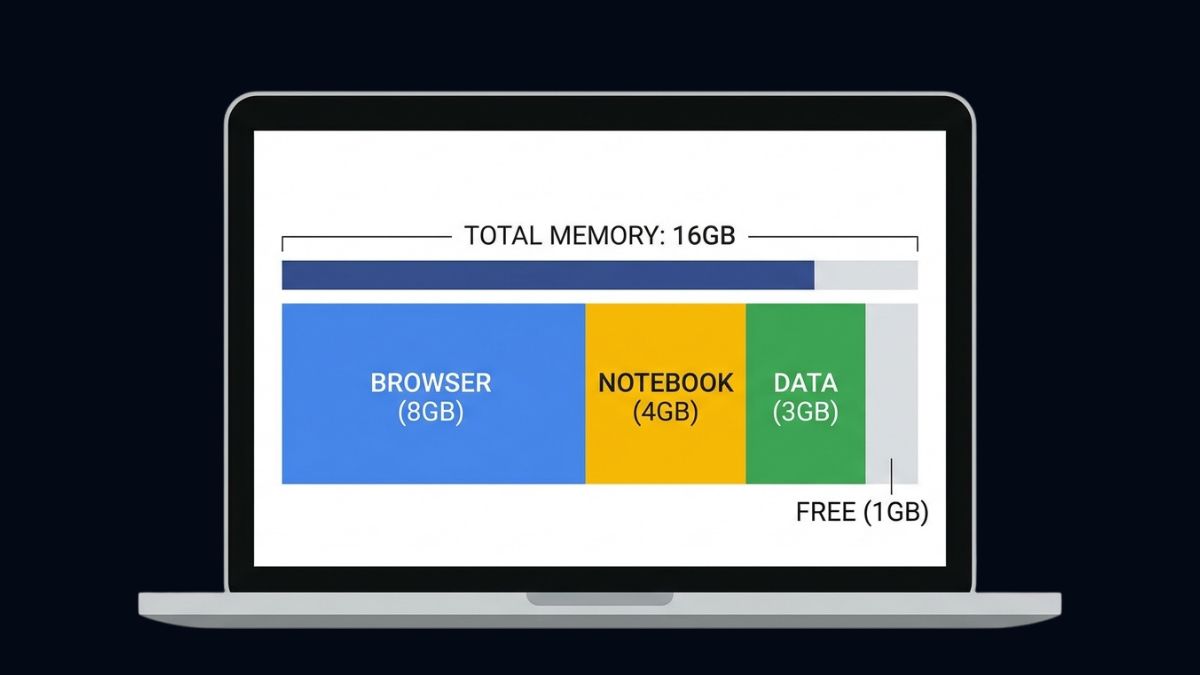
Less than you think. The operating system, a browser with documentation tabs, an IDE, Jupyter, and any Docker containers all share the same pool, so a project that needs 10GB of data can run out of memory even on a 16GB laptop.
One data science buying guide estimates that a basic development setup alone consumes about 9 to 19GB, and a reviewer reported watching data scientists hit swap space on 16GB with datasets that were not especially large. When memory runs out, the system swaps to disk and operations that took seconds take minutes. That slowdown is the common symptom of too little RAM, and it feels like a slow laptop rather than an error. If you work in notebooks, remember that variables stay in memory until you delete them or restart the kernel, which quietly raises usage over a long session.
Ways your RAM disappears:
- Browser tabs, chat apps, and video calls running alongside your work
- Several notebook kernels holding large DataFrames at the same time
- Docker containers and virtual machines, which reserve memory up front
- Copies of data made during cleaning, merging, and feature engineering
Is 16GB Enough for Deep Learning?
For learning and small models, yes, but system RAM is not the main limit. For deep learning, the GPU’s VRAM decides what you can train, and 16GB of system RAM alone will not let a large model run.
Training a neural network keeps the model and each batch of data in VRAM, not in system RAM. Published guidance for local training suggests 12GB or more of VRAM as a reasonable starting point, as covered in our comparison of the RTX 5070 vs RTX 5080 laptop for machine learning. System RAM still matters for loading and preprocessing data, and tutorial environments often state their needs plainly: one 2025 university workshop on protein language models lists 16GB minimum and 32GB recommended. A guide to data science laptops notes that 16GB of RAM limits large model training. For students, free notebook services such as Google Colab and Kaggle offer GPU access, so a 16GB laptop plus a cloud notebook covers coursework without a high-end machine.
What to check for deep learning:
- VRAM first, since it limits model size and batch size
- System RAM second, for data loading, preprocessing, and multitasking
- Cloud notebooks for large jobs, which avoid buying hardware for occasional use
Is 16GB Enough to Run Local Language Models for ML Work?
It runs small models only. A 16GB laptop can run a 7B to 8B language model at 4-bit quantization, but it is tight, and larger models need more memory. This matters if your machine learning work includes local LLM experiments.
A 4-bit 8B model uses roughly 5 to 6GB plus 20 to 30 percent overhead for context, so it fits, but you share the remaining memory with everything else. OpenAI’s gpt-oss-20b is built to fit a 16GB memory envelope, yet in practice 24GB of total system RAM is the realistic minimum without a GPU, since the operating system needs room, and 32GB gives comfort. Our guides on what laptop specs you need to run ChatGPT locally and how to run a local LLM with Ollama cover these sizes in detail. More RAM will not make a model faster once it fits, as explained in why more RAM did not make AI faster, so buy memory for the size of model you want, not for speed.
Local LLM guidance by memory:
- 16GB: 7B to 8B models at 4-bit, with little room left over
- 24GB: the realistic minimum for a 20B-class model without a GPU
- 32GB: comfortable for 20B-class models, and workable for 32B-class quantized models, whose weights are about 19 to 20GB
- 64GB: comfortable for 32B-class models with long context and other apps open
Is 16GB Enough on a Mac or a Laptop With Soldered RAM?
On a Mac, 16GB is both your RAM and your GPU memory, so it goes less far than it looks. On any laptop with soldered memory, you cannot upgrade later, which makes the amount you buy permanent.
Apple silicon uses unified memory, so the GPU and the Neural Engine draw from the same pool as the CPU. That is efficient, but your data, your notebook, and any local model all compete for 16GB. A Windows laptop with a discrete GPU separates system RAM from VRAM, so 16GB of RAM plus 8GB or 12GB of VRAM gives you more total working memory than a 16GB Mac, though VRAM is limited to what the GPU holds. Many thin laptops, including the ThinkPad X1 Carbon, solder their memory. If you plan to keep a laptop for three or more years, or your work is growing, 32GB is cheaper insurance than replacing the machine.
Upgrade rules of thumb:
- Soldered or unified memory cannot be upgraded, so buy for where your work will be in two or three years
- On a Mac, treat unified memory as both RAM and VRAM
- On a Windows laptop with a discrete GPU, check VRAM as well as RAM
How Can You Stretch 16GB for Machine Learning?
You can handle larger datasets on 16GB by loading less data at a time and using more memory-efficient tools. The most effective changes cost nothing.
Read only the columns you need, convert large text columns and integers to smaller types, and store data in a columnar format such as Parquet instead of CSV. Process data in chunks, or use a library built for out-of-memory work: Polars, for example, offers lazy evaluation that can process data larger than RAM. Sample your data while developing and run the full dataset once. Close unused notebook kernels and delete large variables when you finish with them. For occasional large jobs, run them in a cloud notebook instead of buying more RAM.
Memory-saving habits:
- Load only needed columns and use smaller data types
- Use Parquet instead of CSV for repeated work
- Process in chunks or use a lazy library such as Polars
- Develop on a sample, then run the full dataset once
- Restart kernels and free large variables regularly
When Should You Buy 32GB Instead of 16GB?
Buy 32GB if your datasets approach 5GB or more, you run Docker or virtual machines, you experiment with local language models, or you plan to keep the laptop for years. Otherwise 16GB is enough to learn and to do a lot of real work.
Choose 32GB when memory cannot be upgraded later, because the extra capacity is the only way to keep the laptop useful as projects grow. Stay at 16GB if you mainly learn, work with small to moderate datasets, and use cloud notebooks for heavy jobs.
Pick 32GB if you:
- Work with datasets of several gigabytes or run multiple heavy tools at once
- Use Docker, virtual machines, or several notebook kernels
- Want to run local language models above the 8B class
- Own a laptop with soldered memory and plan to keep it for years
FAQ
Yes for learning, classical machine learning, and analyst work on datasets up to a few gigabytes. It is tight for large datasets and not enough for heavy deep learning or larger local language models.
For small models and coursework, yes. The real limit is GPU VRAM, with 12GB or more a reasonable starting point for local training, so system RAM matters less than the GPU.
It depends on the data and the operations. Guides range from about twice your dataset’s size for simple work to 5 to 10 times for heavy transformations, so a few gigabytes of data is comfortable on 16GB.
Only for small learning exercises. It struggles once you load a roughly 1GB dataset into pandas, so 16GB is the practical minimum.
Yes, a 7B to 8B model at 4-bit quantization, but it is tight. Models in the 20B class need about 24GB of system RAM without a GPU.
Not by itself. More RAM prevents slowdowns from swapping, but once your data fits, training speed depends on the CPU or GPU, and for deep learning on VRAM.
Choose 32GB if the memory is soldered and you plan to keep the laptop for years, or if you work with larger data or local models. Choose 16GB for learning and moderate projects with cloud notebooks for heavy jobs.
Final words
In 2026, 16GB of RAM is enough for learning machine learning, classical models, and analyst work on moderate datasets, but it leaves little room for large data, Docker, or local language models. For deep learning, VRAM matters more than system RAM.
Buy 16GB if you are learning or doing moderate work, and 32GB if the memory is soldered, your data is growing, or you want to run local models. Use memory-saving habits and cloud notebooks before spending more.
Learn more about how to choose an AI laptop: RAM, VRAM, GPU, NPU, and CPU →