
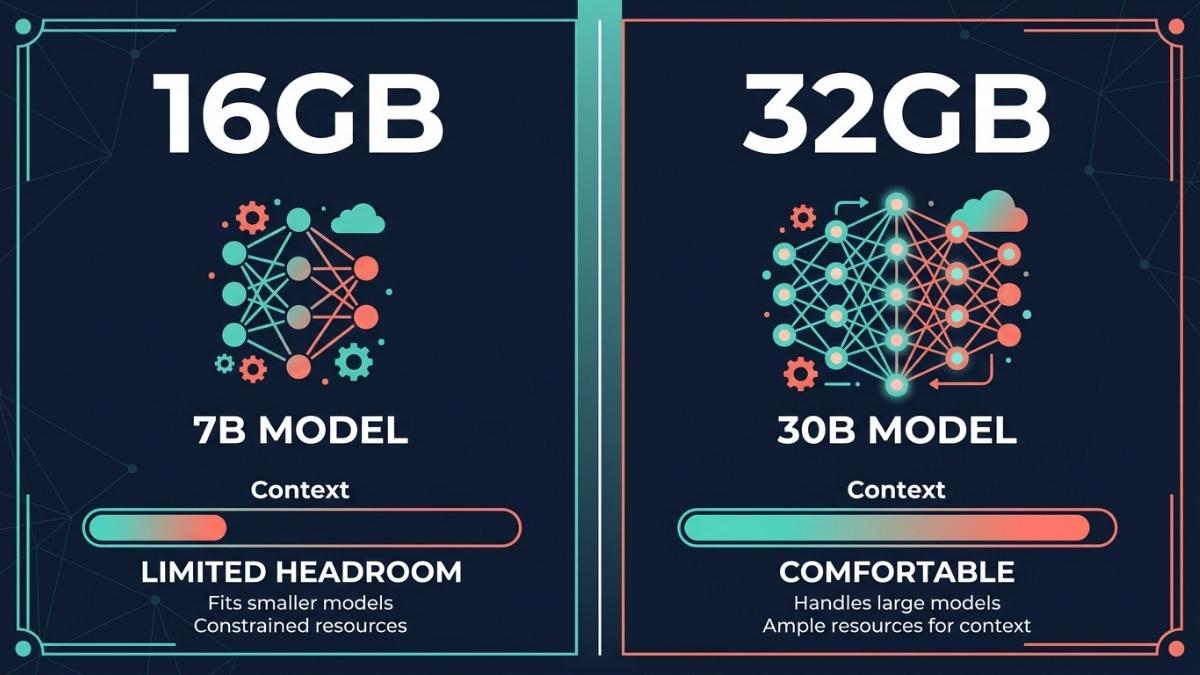
For serious AI work on a MacBook Air M5, 32GB is the correct configuration. The 16GB model is limited to 7B-9B class models and leaves minimal headroom for context, KV cache growth, and background apps running simultaneously. The 32GB model unlocks 30B parameter models, handles long-context sessions comfortably, and future-proofs the machine as model requirements grow. Unified memory cannot be upgraded after purchase, making this the most important buying decision you will make for the M5 Air. If budget is the constraint, the 24GB configuration is a meaningful middle ground.
Why Does Unified Memory Matter More Than RAM on Other Laptops?
On a standard Windows laptop, GPU and CPU use separate memory pools. The GPU has its own VRAM, and the CPU uses system RAM. On Apple Silicon, both share a single unified memory pool at the same 153 GB/s bandwidth. This means every gigabyte of unified memory on a MacBook Air M5 is fully accessible to the GPU for loading and running AI models, with no transfer penalty between pools.
The practical consequence is that a 16GB MacBook Air M5 gives the GPU access to 16GB of high-speed memory. But macOS and background apps consume 3 to 5GB at minimum, leaving only 11 to 13GB available for a model and its KV cache. A 32GB configuration gives the GPU access to 32GB, leaving approximately 24 to 26GB free for model inference after the OS takes its share. That gap determines which models you can run and how long your sessions remain responsive before memory pressure causes slowdowns.
Unified memory also cannot be upgraded after purchase. Unlike system RAM on a Windows laptop, there is no slot to add more later. The configuration you choose at checkout is permanent for the life of the machine. This makes the memory decision at purchase the single most consequential hardware choice for the MacBook Air M5.
What Models Can You Run on 16GB vs 32GB?
The model size ceiling is the clearest practical difference between the two configurations. On a 16GB Air M5, after reserving memory for macOS and a browser or IDE, you have approximately 11 to 13GB available for a model. At Q4_K_M quantization, this covers 7B to 9B models comfortably. According to JMLab’s 2026 benchmark data, the top performer in this tier is Qwen2.5 VL 7B at Q4_K_M (4.8GB), which runs at approximately 70 tokens per second and achieves 0.90 accuracy on their rubric, matching models several times its size. For code work, Qwen2.5 Coder 7B at MLX 8-bit (8.1GB) runs at around 54 tokens per second and fits on 16GB if other apps are closed.
On a 32GB Air M5, the available model budget expands to approximately 24 to 26GB, which unlocks the 30B parameter tier entirely. Models like Qwen2.5-32B and Mixtral 8x7B load comfortably at Q4 quantization and offer meaningfully better output quality for complex reasoning, long-document analysis, and code review tasks. According to InsiderLLM’s April 2026 guide, the 2026 default for 32GB configurations is Qwen 3.6-35B-A3B, a Mixture-of-Experts model with only 3B parameters active per token whose model file is approximately 20GB at Q4 while running at near-3B speeds. This model tier is where local AI output quality becomes genuinely comparable to mid-tier cloud models for many tasks.
The 24GB configuration sits between the two. It handles 14B models well and can run some 27B dense models tightly, though with limited context window headroom. According to InsiderLLM, 24GB supports Qwen 3.6-27B dense at Q4 quantization, though it is tight and requires closing most background applications during inference.
How Does Memory Affect Context Length and Session Quality?
Model size is only one dimension of the memory equation. The KV cache, which stores the attention data for your active conversation, grows with every token generated and with every increase in context window size. A 7B model at Q4 that loads in 5GB can consume another 2 to 4GB of KV cache during a long session with a large context window, pushing total memory usage above what many 16GB users expect.
On the 16GB configuration, this creates a practical ceiling on session quality. Long conversations, large document inputs, multi-file code analysis, and any prompt that fills a 16K to 32K context window will compress the KV cache or cause the model to truncate earlier context. According to AI Agents Kit’s 2026 Mac guide, model weights should never exceed 60% of unified memory to preserve headroom for KV cache and context growth. On 16GB with macOS overhead, this rule limits safe model weight budgets to under 6GB, which means only 3B to 4B models technically satisfy it. For the 7B tier to work well on 16GB, you need to be disciplined about context lengths and close other applications.
On the 32GB configuration, context management is far less constraining. Longer conversations, multi-document RAG pipelines, and extended agentic sessions operate within comfortable memory headroom. The 32GB configuration also handles concurrent app use better: running Xcode, a browser with several tabs, and Ollama simultaneously is practical on 32GB in a way that frequently causes memory pressure warnings on 16GB.
Which Configuration Should You Buy?
Buy the 32GB configuration if local LLM inference is a meaningful part of your workflow, if you plan to run models beyond 7B parameters, if you do any document-heavy AI work with large context windows, if you use your Mac for AI-assisted coding with multi-file context, or if you intend to keep the machine for four or more years. The upgrade cost is paid once and is permanent. The model quality difference between 8B and 30B tier models is significant and grows more important as local models improve each quarter.
Buy the 16GB configuration if AI is occasional rather than central to your work, if you primarily use cloud AI APIs and only experiment locally when curious, if budget is a genuine constraint and the upgrade cost represents a meaningful sacrifice, or if you are a student or beginner who wants to learn about local AI without committing to the full setup cost now. The 16GB model runs 7B to 9B models that are capable for general questions, writing assistance, and light coding help. It is a reasonable starting point with the understanding that you are accepting a model quality ceiling.
Consider the 24GB configuration as a middle ground if you want more headroom than 16GB provides but the 32GB cost is a stretch. It handles 14B models well and covers the majority of practical AI use cases without the top-tier price of the 32GB configuration.
Is the Memory Upgrade Worth the Extra Cost?
The memory upgrade from 16GB to 32GB on the MacBook Air M5 represents a cost paid once for the life of the machine. Evaluated against the model quality difference it unlocks, most AI developers consider it the best value upgrade available in the configuration options. LLM Picker’s 2026 MacBook Air M5 guide concludes that for serious local AI work, the 32GB configuration is non-negotiable and the price premium is the best investment you can make in your AI workflow on Apple Silicon.
The counterargument applies to users whose AI use is light and API-first. If you primarily work through Claude, ChatGPT, or other cloud APIs for heavy tasks and only run local models occasionally for quick experiments, the 16GB configuration handles that pattern well. The upgrade makes the most sense when local inference is a primary workflow rather than a secondary curiosity.
One important framing: because unified memory cannot be upgraded, this is not a question of whether you need 32GB today. It is a question of whether you might need it at any point during the 3 to 5 year life of the machine. Given that local model quality and complexity are improving every quarter, most users planning a 4-plus year ownership horizon will encounter a moment where 32GB would have served them and 16GB does not.
Frequently Asked Questions
Yes. It runs 7B to 9B models at Q4 quantization comfortably, generating around 40 to 70 tokens per second depending on the model. These are genuinely capable models for everyday AI tasks. The limitation is the ceiling, not the floor.
At Q4_K_M quantization, a 32GB configuration handles models up to approximately 30B parameters with comfortable headroom for context. MoE models like Qwen 3.6-35B-A3B fit at around 20GB, leaving room for a reasonable context window and background apps.
Not directly. Token generation speed on Apple Silicon is primarily determined by memory bandwidth (153 GB/s on the M5 Air), which is fixed regardless of memory configuration. More memory allows larger models to load fully into memory, avoiding slow SSD swap, which does affect effective throughput significantly when you exceed available memory.
Yes, and it is a reasonable middle ground. The 24GB configuration handles 14B models well and fits some 27B models tightly. If the 32GB upgrade is a stretch, 24GB provides meaningfully more headroom than 16GB for AI workflows.
Yes. Apple Intelligence features including Writing Tools, Smart Reply, and image generation run on-device via the Neural Engine and use a fraction of the memory that local LLMs require. Even 8GB is technically sufficient for Apple Intelligence features.
Final words
Memory configuration is the most important and only permanent hardware decision on the MacBook Air M5. For AI work, 32GB is the configuration that unlocks the model tier where local inference quality becomes genuinely useful for complex professional tasks. The 16GB model runs capable 7B models and is appropriate for casual AI use, but it will limit you at the worst moment: when you want to run a model that is just slightly too large, or when a long session fills your context and the machine slows.
Buy the 32GB configuration once and do not think about it again. Buy the 16GB configuration with clear eyes about its ceiling and a plan to use cloud AI for the workloads it cannot handle.
Learn more about the full MacBook Air M5 review for AI workloads →