
Last Updated on October 4, 2026 by Spencer Lee
You cannot run ChatGPT itself locally, since it is a proprietary hosted model that only runs on OpenAI’s servers, but you can run OpenAI’s own open-weight alternative, gpt-oss-20b, on a laptop with at least 16GB of VRAM or 24GB of system memory. That model offers reasoning ability comparable to OpenAI’s smaller hosted models and fits on a single consumer GPU or a high-memory laptop using MXFP4 quantization. For anyone without a discrete GPU, 24GB or more of system RAM, with at least 8GB left over for the operating system, is the realistic minimum, and 32GB gives real comfort.
Why This Matters
Searches for how to “run ChatGPT locally” have grown alongside interest in privacy and offline AI, but the phrase itself creates confusion, since ChatGPT is not a file anyone can download. What people actually want is a local equivalent, something that answers questions and holds a conversation the way ChatGPT does, without sending prompts to a remote server. OpenAI itself addressed this gap in 2025 by releasing open-weight models built for exactly this purpose, which changes the answer to this question considerably compared to a year earlier.
By the end of this article you will know why ChatGPT itself cannot run on a laptop, which open-weight model comes closest to replicating it locally, and the specific RAM, VRAM, CPU, and storage numbers that determine whether your laptop can run it comfortably or not at all.
Also read: How to Choose an AI Laptop: RAM, VRAM, GPU, NPU, CPU
Can You Actually Run ChatGPT Locally?
No, ChatGPT cannot run locally, because it is a closed, proprietary model that OpenAI only serves through its own cloud infrastructure, with no downloadable version available to the public. What people usually mean by this question is running an open-weight model that behaves similarly, and OpenAI has actually released one itself.
In 2025, OpenAI published gpt-oss-20b and gpt-oss-120b, its first open-weight model release since Whisper and CLIP, licensed under Apache 2.0 so anyone can download, run, and even fine-tune them. These are not ChatGPT, and they do not share the exact same training or capabilities as GPT-5 or whichever model currently powers the hosted product, but they were built by the same company specifically to give people a local option with strong reasoning ability. Other open-weight families, including Llama, Qwen, and Mistral, offer similar local alternatives, and all of them run through the same tools, such as Ollama and LM Studio.
Key clarifications before buying hardware:
- ChatGPT itself is not available as a download under any circumstances
- OpenAI’s own open-weight models, gpt-oss-20b and gpt-oss-120b, are the closest official local equivalent
- Other open-weight models from Meta, Alibaba, and Mistral offer comparable local alternatives
- All of these run through free tools like Ollama or LM Studio, not through ChatGPT’s own app or website
- Hardware requirements below apply to these open-weight models, not to ChatGPT itself
How Much RAM Do You Need to Run a Local ChatGPT-Style Model?
Twenty-four gigabytes of system RAM is the realistic minimum for running gpt-oss-20b without a dedicated GPU, since that leaves roughly 16GB for the model and 8GB for the operating system and other software. Thirty-two gigabytes gives meaningfully more comfort and headroom for longer conversations.
OpenAI built gpt-oss-20b to fit within a 16GB memory envelope using MXFP4 quantization, a 4-bit format that compresses its 21 billion parameters down to roughly 12 to 13GB on disk. That number is the model’s footprint alone, and it does not account for the operating system, browser, or any other running software, which is why 24GB of total system memory is the more honest minimum for a smooth experience without a GPU. Running the same model entirely on CPU and system RAM works, but generation speed depends heavily on memory bandwidth, and typical laptop DDR5 or LPDDR5 memory runs at 20 to 100GB per second, far slower than a dedicated GPU’s memory.
RAM guidance for local ChatGPT-style models:
- 16GB total system RAM: technically possible for the smallest quantized models, but tight and prone to slowdowns
- 24GB total system RAM: the realistic minimum for gpt-oss-20b without a GPU, leaving room for the OS
- 32GB total system RAM: comfortable headroom for longer conversations and background applications
- 64GB or more: only relevant if you plan to experiment with larger models beyond gpt-oss-20b
Do You Need a GPU and How Much VRAM?
A GPU is not strictly required, but a GPU with at least 16GB of VRAM makes gpt-oss-20b noticeably faster and more responsive than running it on CPU alone. Memory bandwidth, not just capacity, is what separates a good experience from a frustrating one.
At Q4_K_M quantization, gpt-oss-20b uses roughly 11 to 12GB of VRAM to load, which fits on a 16GB card with room to spare for context and background processes. A GPU with GDDR6X or GDDR7 memory delivers memory bandwidth on the order of 1,000GB per second or more, dramatically outperforming a laptop’s system memory for this kind of workload. Without a GPU, the same model runs entirely through the CPU and system RAM instead, which works but produces noticeably slower responses, especially as conversations grow longer and the context window fills up.
VRAM guidance for local ChatGPT-style models:
- No GPU, CPU only: works with 24GB or more of system RAM, but expect slower response generation
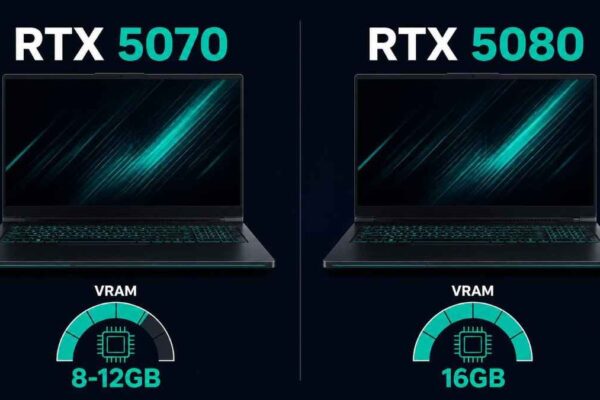
- 8 to 12GB VRAM: workable for smaller quantizations, though gpt-oss-20b will be tight
- 16GB VRAM: the sweet spot for gpt-oss-20b, loading comfortably with headroom for context
- 24GB VRAM or more: extra comfort for longer conversations and faster response generation
Also read: How Much VRAM Do You Need for AI Workloads in 2026?
What CPU and NPU Specs Matter for Local AI Chat?
The CPU matters most when you are running a model without a GPU, since it handles the entire inference workload directly, while an NPU mainly benefits background AI features rather than the chat model itself. A recent multi-core CPU with strong single-thread performance keeps a CPU-only setup usable.
For GPU-accelerated setups, the CPU’s job shrinks considerably, since the GPU handles the heavy computation and the CPU mostly manages the surrounding application and data flow. For CPU-only setups, a modern chip with eight or more cores, such as a recent Intel Core Ultra, AMD Ryzen, or Apple Silicon chip, produces noticeably better token generation speed than an older or lower-core-count processor. NPUs, the dedicated AI chips found in Copilot+ PCs and Apple Silicon Macs, are built for efficient small-scale inference tasks like live captions and background blur, and current consumer tools like Ollama and LM Studio do not route full chat model inference through the NPU the way they do through a CPU or GPU.
What to prioritize by setup type:
- CPU-only setup: prioritize a recent 8-core or higher processor with strong single-thread speed
- GPU-accelerated setup: CPU requirements relax considerably, since the GPU carries the heavy workload
- NPU: helpful for other on-device AI features, but not currently the component running your chat model’s inference
- Apple Silicon: benefits from its unified memory design more than from its Neural Engine for this specific task
How Much Storage Do You Need for Local Models?
A 512GB SSD covers a single model comfortably, but 1TB is the more practical choice if you plan to try more than one local model over time. Model files themselves are large, and storage fills up faster than most people expect.
Gpt-oss-20b takes up roughly 12 to 13GB on disk thanks to its native MXFP4 quantization, which is modest compared to many other open-weight models at similar parameter counts. However, anyone experimenting with local AI tends to accumulate several models over time, comparing a general assistant against a coding-focused variant or a different open-weight family entirely, and each additional model adds several gigabytes to a dozen or more. A 512GB SSD works fine for one or two models alongside a typical operating system installation, but it fills up quickly once experimentation starts, which is why 1TB is the more comfortable long-term choice.
Storage guidance:
- 512GB SSD: fine for one local model plus normal OS and application use
- 1TB SSD: the more practical choice for anyone planning to try multiple models over time
- Model file sizes: gpt-oss-20b is around 12 to 13GB, while larger open-weight models can run into tens of gigabytes each
- Free space buffer: always keep meaningful headroom beyond the model’s listed size, since context caching and application overhead add up
Which Local Model Is Closest to ChatGPT, and What Laptop Runs It Best?
Gpt-oss-20b is the closest official local equivalent to ChatGPT, since OpenAI built and released it specifically for this purpose, and it runs best on a laptop with either 16GB or more of GPU VRAM or 32GB of system RAM without a GPU. Its larger sibling, gpt-oss-120b, is not realistically a laptop model at all.
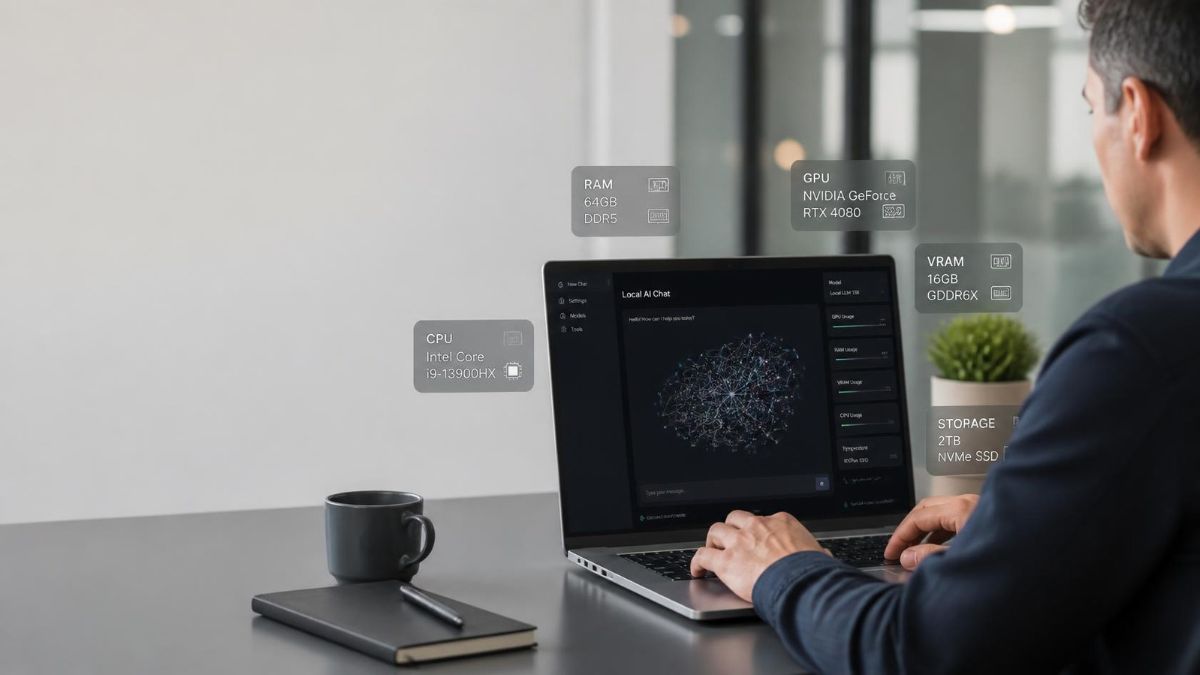
Gpt-oss-120b has 117 billion total parameters, though only about 5.1 billion are active at once thanks to its mixture-of-experts design, and it still needs around 80GB of memory to run, which puts it firmly in workstation or multi-GPU server territory rather than laptop hardware. For a genuinely local, laptop-friendly experience, gpt-oss-20b is the realistic target, and it holds up well against comparisons to some of OpenAI’s smaller hosted models in reasoning tasks. A laptop with 16GB of VRAM, such as certain RTX 4080 or 5080 mobile configurations or a high-memory Apple Silicon Mac, handles it well, while a laptop without a GPU needs the fuller 32GB of system RAM to run it comfortably.
Also read: Best Laptops for AI Workloads in 2026: Top Picks Tested
Model-to-laptop matching:
- Laptop with 16GB+ VRAM (RTX 4080/5080 mobile, or 16GB+ Apple unified memory): runs gpt-oss-20b comfortably and quickly
- Laptop with no GPU, 32GB system RAM: runs gpt-oss-20b at slower but usable speed
- Laptop with no GPU, 16 to 24GB system RAM: technically possible but tight, expect noticeable slowdowns on longer conversations
- Any laptop attempting gpt-oss-120b: not realistic outside a high-end workstation or server-class setup
What Mistakes Do People Make When Setting Up a Local ChatGPT Alternative?
The most common mistake is searching for a way to download ChatGPT itself, when no such download exists under any circumstances, and spending time on tools or guides that misunderstand this from the start. A second mistake is assuming any open-weight model will feel identical to ChatGPT, when different model families vary in tone, reasoning style, and capability even at similar parameter counts.
A third mistake is buying hardware based only on a model’s listed disk size, without accounting for the extra memory needed for context and runtime overhead once a real conversation starts. A fourth mistake is expecting an NPU to accelerate chat model inference the way a GPU does, when current local AI tools route that workload through the CPU or GPU instead.
Mistakes to avoid:
- Searching for a literal ChatGPT download, which does not exist in any form
- Assuming all open-weight models feel the same as ChatGPT, when reasoning style and quality vary by family
- Underestimating real memory needs by looking only at a model’s on-disk size, not its runtime footprint
- Expecting an NPU to speed up chat model inference the same way a discrete GPU does
- Attempting to run gpt-oss-120b on standard laptop hardware, when it requires workstation or server-class memory
FAQ
No, ChatGPT is a closed, proprietary model that only runs on OpenAI’s own servers, and there is no legitimate downloadable version of it available anywhere.
OpenAI’s own open-weight model, gpt-oss-20b, is the closest official equivalent, since the same company built it specifically as a locally runnable alternative with strong reasoning ability.
Yes, with 24GB or more of system RAM, though response generation will be noticeably slower than on a GPU with dedicated VRAM and high memory bandwidth.
Roughly 12 to 13GB on disk, thanks to its native MXFP4 quantization, though you should keep meaningful extra storage headroom beyond that figure for smooth operation.
Generally no, since it needs around 80GB of memory to run, which puts it outside the range of even most high-end laptops and into workstation or server-class hardware.
Not as much. Once a GPU handles the heavy computation, the CPU’s role shrinks to managing the surrounding application, so a mid-range CPU paired with a strong GPU still performs well.
Not directly. Current tools like Ollama and LM Studio run chat model inference through the CPU or GPU, not the NPU, so NPU specs mainly matter for other on-device AI features.
Final words
Running something like ChatGPT locally really means running an open-weight alternative, and OpenAI’s own gpt-oss-20b is the closest official option available today. A laptop with 16GB or more of GPU VRAM handles it comfortably, while a GPU-less setup needs 24 to 32GB of system RAM to stay usable.
Match your hardware plan to gpt-oss-20b specifically rather than assuming any local model behaves the same, and check your GPU’s VRAM or your total system RAM against the numbers above before downloading anything.
Learn more about how to run a local LLM on a laptop with Ollama →