
Last Updated on October 25, 2026 by Spencer Lee
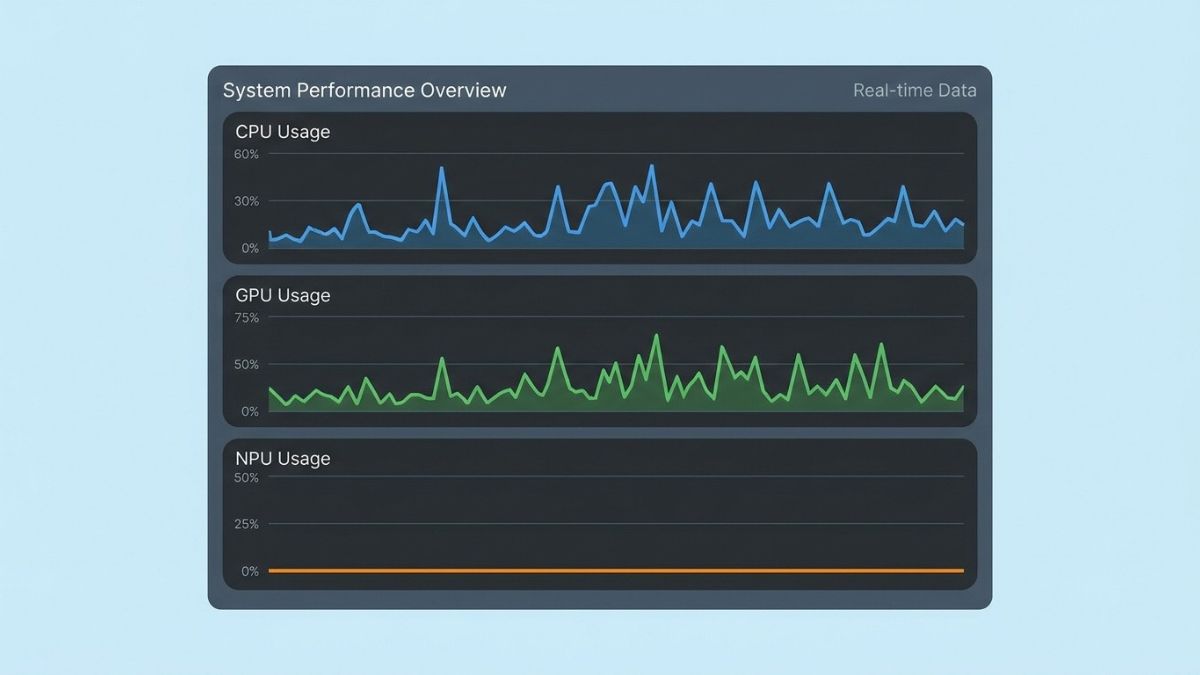
Your NPU is probably working as designed: most AI apps never use it. Ollama, LM Studio, and llama.cpp run on the GPU or CPU, so Task Manager shows 0% NPU while they work. The NPU only runs software written for it through a vendor toolchain such as OpenVINO, QNN, or AMD’s Ryzen AI tools, plus Windows features like Windows Studio Effects and Live Captions. If it never moves even for those, check for a missing driver or an NPU rated below 40 TOPS. For local chatbots, GPU speed and memory matter far more than NPU TOPS.
Why This Matters
You bought an AI laptop with a 40 or 50 TOPS NPU, started a local model, opened Task Manager, and saw the NPU sitting at 0% while the CPU or GPU did all the work. It is natural to think the NPU is broken, disabled, or wasted money. In almost every case it is none of those.
The gap between NPU hardware and NPU software is one of the biggest sources of confusion in AI laptops. This article explains how to check what your NPU is doing, why the most popular local AI tools ignore it, which features do use it, and what to do if you want to run a model on it. It builds on our guide to how to choose an AI laptop, which explains what each chip does.
How do you check whether your NPU is being used?
Open Task Manager and look for an NPU entry on the Performance tab. Recent Windows 11 builds show NPU usage when Windows detects one, and the same view in the Processes list can show an NPU column per app.
Microsoft documents NPU monitoring for Qualcomm, Intel, and AMD devices, including Copilot+ PCs. If Task Manager lists only CPU, Memory, Disk, Network, and GPU, Windows is not exposing an NPU on that laptop, which usually points to a missing driver or a machine that has no NPU. When an NPU is present and an app falls back to the CPU, the NPU column stays at 0%, the NPU engine stays blank, and CPU use is high. To test the hardware itself, run something known to use it, such as turning on background blur in Windows Studio Effects during a video call, and watch the NPU graph.
A quick check:
- Task Manager, then Performance, then look for an NPU entry below the GPU entries
- No entry: check for a missing NPU driver and update Windows and your laptop maker’s drivers
- Entry at 0% during a local chatbot: this is normal for most apps
- Entry moves during a video call with blur or captions on: the NPU works
Is a 0% NPU reading normal?
Yes, for most apps. Most software never targets the NPU, so the reading stays at 0% even while the CPU and GPU are busy. That is not a fault.
The popular local AI tools show this clearly. Open Task Manager while chatting with a model in Ollama or LM Studio and the CPU or GPU graph moves while the NPU graph does not, on Intel, AMD, and Qualcomm laptops alike. A 2026 comparison of AI PCs makes the same point: NPU performance has grown quickly, but the number of apps that use it has barely increased. The NPU is still doing real work, but only for specific Windows features and apps built for it.
Why don’t Ollama and LM Studio use the NPU?
They are built on llama.cpp and load models in the GGUF format, and the NPU needs models converted to a different format and compiled for each vendor’s own software stack. As of mid-2026, there is no NPU backend in the mainstream builds.
Each NPU maker has its own toolchain: OpenVINO on Intel, the QNN execution provider on Qualcomm, and the Vitis AI provider on AMD. Developers have to convert a model to ONNX and compile it for that provider, and the stacks are fragmented, which makes them painful for open-source projects to maintain. Open feature requests for Intel, AMD, and Qualcomm NPU support sit unresolved in these projects, so for now Ollama runs on the CPU, GPU through CUDA, ROCm, Vulkan, or Metal, and LM Studio does the same. Our guides on how to run a local LLM on a laptop with Ollama and what laptop specs you need to run ChatGPT locally explain what to buy for those tools instead.
Why the NPU sits idle:
- GGUF models are not NPU-ready, and NPUs need ONNX models compiled per vendor
- Intel, AMD, and Qualcomm each use a different software stack
- NPU backends in the mainstream tools are not available yet
- Windows ML can pick an NPU provider automatically, but only for apps built to use it
Which apps and features actually use the NPU?
Mainly Windows’ built-in AI features and a small set of apps written for NPUs. They run background tasks efficiently, which is exactly what NPUs are designed for.
On a Copilot+ PC, the NPU powers Windows Studio Effects for camera and microphone work, including background blur, eye contact, and auto framing, along with Voice Focus noise filtering, Live Captions with translation, Recall, Click to Do, and small Microsoft models such as Phi Silica. Microsoft Teams uses the NPU-accelerated background blur when Studio Effects is on. Some third-party tools can use it too: the OpenVINO plugins for Audacity let you choose the NPU as the device for certain effects. Availability varies by laptop, driver, and Windows version, and some features need a Copilot+ PC specifically. One source estimates the NPU uses roughly 80 percent less power than the GPU for equivalent sustained tasks, which is why Windows routes these features to it.
Features that typically use the NPU:
- Windows Studio Effects: blur, eye contact, auto framing, and portrait light
- Voice Focus noise filtering on the built-in microphone
- Live Captions with translation
- Recall and Click to Do on Copilot+ PCs
- Teams background blur, through Studio Effects
Could a missing driver or a low-TOPS NPU be the problem?
Yes. If your NPU never moves, even for Windows features, the cause is often a missing driver, an app that cannot send the NPU a model it understands, or an NPU too weak for the feature.
Microsoft names two common causes of CPU fallback: a missing driver, and a data type mismatch, such as sending a 32-bit floating-point model to an NPU that expects 8-bit integer math, or using an operation the NPU does not support. Some laptops also carry an NPU that falls below Microsoft’s 40 TOPS threshold for Copilot+ PCs. One 2026 buying guide describes a laptop with a 17 TOPS NPU that is labeled “NPU-compatible” but gets no Recall, Windows Studio Effects, or Live Captions, because it does not meet that bar. The product page may never mention Copilot+ or list the TOPS number, so check the specifications before you buy.
Troubleshooting steps:
- Update the NPU driver through Windows Update and your laptop maker’s support site
- Confirm your NPU’s TOPS rating against the 40 TOPS Copilot+ threshold
- Check whether the feature you want requires a Copilot+ PC
- Test with a known NPU feature, such as Studio Effects blur, to confirm the hardware works
How can you actually run an ai model on the NPU?
You need software built for your NPU’s vendor stack, and the models are limited to small ones. This is an opt-in path for developers and enthusiasts, not a setting you can switch on.
Several routes exist. On Intel Core Ultra chips, OpenVINO GenAI runs small models on the NPU. On AMD Ryzen AI, AMD’s Lemonade and GAIA tools run hybrid NPU and integrated GPU inference, and FastFlowLM targets the XDNA 2 NPU directly. On Qualcomm laptops, Windows Foundry Local can route models to the NPU through ONNX Runtime. In mainstream tooling these paths cover models up to roughly 4B parameters, and NPU execution has limited support for advanced sampling compared with llama.cpp. If the NPU graph stays at 0% during such a test, the model fell back to the CPU and the configuration needs checking.
NPU routes by platform:
- Intel Core Ultra: OpenVINO GenAI for small models
- AMD Ryzen AI: Lemonade, GAIA, or FastFlowLM
- Qualcomm Snapdragon: Windows Foundry Local through ONNX Runtime
- All platforms: expect small models and more setup than Ollama or LM Studio
What about macs and the apple neural engine?
The same pattern holds on a Mac. Local chat runtimes such as Ollama run on the GPU through Metal or MLX, not on the Neural Engine, and the Neural Engine is used by Apple’s own features and apps built for it.
Apple does not publish a TOPS figure for the Neural Engine, so it is hard to compare with Windows NPUs. On Apple silicon, local model speed depends mainly on unified memory and bandwidth. As on Windows, chip marketing and real software support are separate things.
Should you care that your NPU is idle?
Not for local chatbots, where GPU speed, memory capacity, and memory bandwidth decide performance. The NPU matters for battery life during video calls, captions, and background features, and it matters a little for the future as more apps adopt it.
If you are buying a laptop to run local models, spend on GPU VRAM or unified memory instead of NPU TOPS. If you mostly want efficient on-device features and long battery life, an NPU at or above 40 TOPS is worth having. Either way, do not judge your laptop by the NPU graph during a local chatbot session, since it is expected to stay at zero.
FAQ
Because most apps do not target the NPU. Local chatbots such as Ollama and LM Studio run on the CPU or GPU, so the NPU stays idle unless the software is written for it.
No. As of mid-2026 Ollama runs on CPU, CUDA, Metal, and ROCm or Vulkan, and has no NPU backend.
No. LM Studio runs on llama.cpp and MLX engines on the CPU and GPU, and its NPU support requests remain open.
You generally cannot force it. The app has to be built for your NPU through OpenVINO, QNN, Vitis AI, or Windows ML, and a few apps let you choose the device in their settings.
Some features, such as Recall and Live Captions, require a Copilot+ PC with an NPU of at least 40 TOPS, while others work on more NPUs depending on the driver. Check your laptop’s specifications.
Not generally for large local models. NPUs are built for low-power, sustained tasks, and for chatbots the GPU or the CPU is usually faster and better supported.
Only if you want efficient background AI features and battery life. For running local models, GPU VRAM or unified memory and bandwidth matter far more.
Final words
Your laptop’s NPU is not being used for local AI because the tools you probably run, Ollama and LM Studio, do not support it, and NPUs need software built for each vendor’s stack. It works for Windows features like Studio Effects and Live Captions, and for small models through vendor tools.
Check Task Manager with a known NPU feature, update drivers, and confirm your NPU meets the 40 TOPS Copilot+ bar if you want those features. For running local models, rely on GPU and memory.
Learn more about how to choose an AI laptop: RAM, VRAM, GPU, NPU, and CPU →