
The MacBook Air M5 is the better choice for running local language models thanks to up to 32GB of unified memory shared between CPU, GPU, and Neural Engine, while the Razer Blade 14 with an RTX 5070 is the stronger choice for training, fine-tuning, and any workload that depends on CUDA. The Air’s fanless design favors bursty, on-battery inference, while the Blade 14’s active cooling and 115W TGP GPU sustain heavier workloads for longer when plugged in. Neither wins outright: the right pick depends on whether your AI work is mostly inference on larger open models or mostly training and CUDA-based development.
Why This Matters
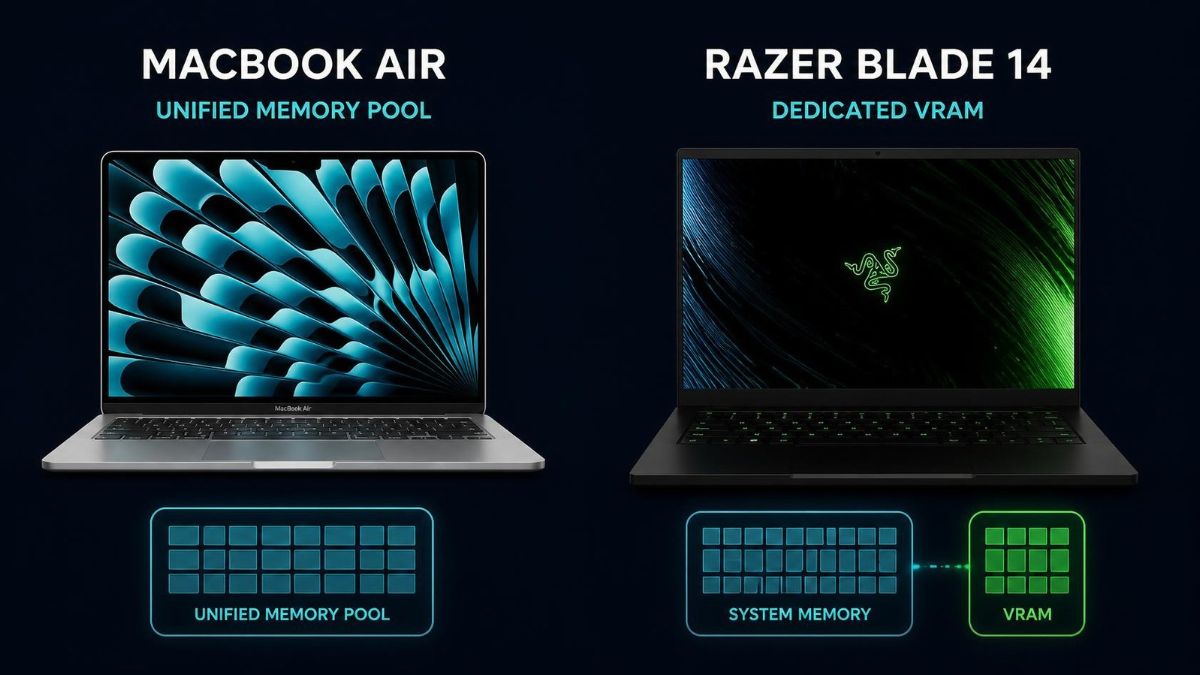
Buyers comparing a MacBook Air to a Windows gaming laptop rarely realize they are comparing two entirely different memory architectures, not just two chips. Apple’s unified memory lets the GPU and Neural Engine draw from the same pool as system RAM, while the Razer Blade 14’s RTX 5070 has its own fixed 8GB of VRAM regardless of how much system RAM the laptop carries. That difference decides which local models actually fit, not just how fast either machine runs them.
By the end of this article you will know how these two laptops differ in memory, GPU architecture, and sustained performance for AI work, which one handles local LLM inference better, which one wins for training and fine-tuning, and which mistakes people make when comparing Apple Silicon directly against an NVIDIA laptop GPU.
What Is the Fundamental Hardware Difference Between These Two Laptops for AI Work?
The MacBook Air M5 uses a unified memory architecture where the CPU, GPU, and Neural Engine all share one memory pool, while the Razer Blade 14 pairs a separate CPU, system RAM, and a discrete RTX 5070 GPU with its own dedicated VRAM. This single architectural choice shapes almost every other difference between them for AI workloads.
🖥️Also read: Apple MacBook Air M5 (2026) Review: Best Laptop for AI?
The MacBook Air M5 ships with a 10-core CPU, up to a 10-core GPU with a Neural Accelerator built into each GPU core, and a 16-core Neural Engine, all sharing unified memory configurable up to 32GB at 153GB/s of bandwidth. It has no fan, relying entirely on passive cooling. The Razer Blade 14 pairs an AMD Ryzen AI 9 365 processor, which includes a 50 TOPS NPU, with an RTX 5070 laptop GPU running at up to 115W TGP with 8GB of dedicated GDDR7 VRAM, backed by up to 64GB of separate LPDDR5X system RAM and an active vapor chamber cooling system. The practical result is that the Mac’s GPU can address a much larger memory pool for AI tasks, while the Blade 14’s GPU is faster per core but capped at a fixed 8GB regardless of how much system RAM you configure.
Core hardware differences:
- Memory architecture: unified pool (Mac) versus separate system RAM and dedicated VRAM (Razer)
- Maximum AI-addressable memory: up to 32GB unified on the Air, versus 8GB VRAM on the Blade 14’s RTX 5070
- Cooling: fanless passive design (Mac) versus active vapor chamber cooling (Razer)
- Dedicated AI silicon: 16-core Neural Engine plus per-core Neural Accelerators (Mac) versus a 50 TOPS NPU alongside CUDA and Tensor Cores (Razer)
- GPU power ceiling: no discrete GPU on the Air versus up to 115W TGP on the Blade 14’s RTX 5070
How Much Memory Does Each Laptop Actually Give You for AI Workloads?
The MacBook Air M5 gives its GPU access to its entire unified memory pool, up to 32GB, while the Razer Blade 14’s RTX 5070 is limited to a fixed 8GB of VRAM no matter how much system RAM the laptop has. This is the single biggest factor separating the two machines for local AI work.
On the Mac, a 32GB configuration leaves enough headroom to load a 4-bit quantized model in the 20B to 27B parameter range with room for context, since the GPU is not boxed into a separate memory pool. On the Blade 14, the RTX 5070’s 8GB VRAM ceiling holds a 7B to 8B model comfortably but leaves little room for longer context windows, and anything larger has to spill into much slower CPU memory or get skipped entirely. The Blade 14’s larger system RAM options, up to 64GB, help general multitasking and CPU-side work, but do not raise the ceiling for GPU-accelerated model inference, since that ceiling is set by VRAM specifically.
Memory comparison for AI use:
- MacBook Air M5, 16GB unified: comfortable for 7B models at Q4, tight for anything larger
- MacBook Air M5, 32GB unified: room for 20B to 27B models at Q4 with usable context left over
- Razer Blade 14, 8GB VRAM (RTX 5070): reliable for 7B models at Q4, limited context headroom
- Razer Blade 14, system RAM (16 to 64GB): improves general multitasking but does not raise the GPU inference ceiling
Which One Runs Local LLMs Better, MacBook Air M5 or Razer Blade 14?
The MacBook Air M5 runs larger local language models better because its unified memory removes the hard VRAM ceiling that limits the Razer Blade 14’s RTX 5070, though the Blade 14 can still outpace the Air on tokens per second for models small enough to fit fully within its 8GB of VRAM.
For anyone who wants to experiment with a range of open-weight models, the Air’s ability to load 20B-class models directly, rather than being capped at 7B to 8B, matters more day to day than a modest speed advantage on smaller models. The Blade 14’s CUDA and Tensor Core acceleration is genuinely fast for models that fit its VRAM, and NVIDIA’s software ecosystem, including tools built around CUDA and TensorRT, remains more mature for quantization and inference optimization than Apple’s growing MLX and Metal-based tooling. In practice, someone who mostly runs 7B to 8B models and wants maximum speed may prefer the Blade 14, while someone who wants headroom to run larger models without hitting a wall will get more mileage from the Air’s memory ceiling.
What decides the winner for local LLMs:
- Model size flexibility: MacBook Air M5 wins clearly, since 32GB unified memory supports far larger models than 8GB VRAM
- Raw speed on models that fit both: Razer Blade 14’s CUDA and Tensor Cores generally edge ahead
- Software tooling maturity: NVIDIA’s CUDA ecosystem remains more established for quantization and inference tuning
- Longer context windows: MacBook Air M5’s larger memory pool handles this more comfortably
Which One Handles Training and Fine-Tuning Better?
The Razer Blade 14 with its RTX 5070 handles training and fine-tuning better overall, since CUDA and Tensor Cores remain the standard for most training frameworks, and its active cooling supports sustained workloads that the MacBook Air’s fanless design is not built for.
Training and fine-tuning place continuous, heavy demand on a GPU for extended periods, which is exactly the scenario where the Blade 14’s vapor chamber cooling and higher TGP ceiling matter most. The MacBook Air M5’s fanless design is genuinely efficient for short, bursty AI tasks and everyday inference, but Apple’s own hardware directory notes that sustained, heavy training loops will eventually cause thermal throttling on a fanless chassis, which is a real limitation for anyone trying to run a lengthy fine-tuning job. On top of the cooling difference, most popular training libraries, from PyTorch’s CUDA backend to common fine-tuning tools like bitsandbytes, were built around NVIDIA hardware first, with Apple’s MLX and Metal Performance Shaders support still catching up in coverage and community tooling.
What favors each machine for training work:
- Sustained thermal headroom: Razer Blade 14’s active cooling favors longer training and fine-tuning sessions
- Software ecosystem maturity: CUDA-based frameworks have broader, more established support for training workflows
- Short, bursty workloads: MacBook Air M5 handles brief training experiments and light fine-tuning without issue
- VRAM ceiling during training: the Blade 14’s 8GB VRAM can become the limiting factor for larger models or batch sizes, where the Air’s bigger memory pool has an advantage despite its cooling limits
How Does Battery Life and Sustained Performance Compare for AI Tasks?
The MacBook Air M5 holds its AI performance far more consistently on battery power than the Razer Blade 14, whose RTX 5070 depends heavily on being plugged in to reach its full 115W TGP. This matters for anyone who wants to run local AI tools away from an outlet.
NVIDIA laptop GPUs, including the RTX 5070 in the Blade 14, typically throttle significantly on battery power, since the battery cannot sustain the same power draw as a wall outlet. Apple Silicon’s efficiency-first design means the MacBook Air maintains close to its plugged-in performance even when unplugged, and Apple rates the Air for up to 18 hours of battery life under typical use. For inference tasks specifically, bursts of activity followed by idle periods, the Air’s efficiency and battery consistency make it the more dependable choice for mobile AI work. For anyone whose AI workloads happen mostly at a desk near a power outlet, this advantage matters less.
Battery and sustained performance factors:
- On-battery GPU performance: MacBook Air M5 holds up much better than the Blade 14’s RTX 5070, which is built around plugged-in power delivery
- Rated battery life: up to 18 hours for the Air under typical use, considerably less for the Blade 14 under sustained GPU load
- Sustained plugged-in workloads: Razer Blade 14’s active cooling gives it the edge for long training sessions at a desk
- Fanless throttling: the Air will slow down under extended heavy training loops even when plugged in, due to its passive cooling
Which One Should You Buy Based on Your AI Workload?
Buy the MacBook Air M5 if your AI work is mostly local model inference, experimentation with larger open-weight models, or mobile use away from an outlet. Buy the Razer Blade 14 with an RTX 5070 if your work centers on training, fine-tuning, or any CUDA-dependent framework, and you mostly work plugged in at a desk.
🖥️Also read: 16GB vs 32GB MacBook Air M5: Which Is Better for AI Work in 2026?
Price is also part of this decision: the MacBook Air M5 starts at $1,099 for the base 13-inch configuration, though reaching 32GB of unified memory adds to that cost, while a Razer Blade 14 configured with the RTX 5070, 32GB of RAM, and a 1TB SSD runs around $2,699. For buyers who want a single machine that leans toward inference and portability at a lower price, the Air is the more efficient purchase. For buyers whose work depends on CUDA-based frameworks or who train models regularly, the Blade 14’s higher price reflects genuinely different hardware built for that job.
Decision guide by workload:
- Mostly inference on local models, want portability and battery life: MacBook Air M5, ideally the 32GB configuration
- Mostly training, fine-tuning, or CUDA-dependent tools: Razer Blade 14 with the RTX 5070
- Budget-conscious buyer wanting general AI experimentation: MacBook Air M5 offers strong value at its starting price
- Need both gaming-class GPU performance and Copilot+ style NPU features on Windows: Razer Blade 14 covers both in one machine
What Mistakes Do People Make Comparing Apple Silicon to NVIDIA Laptop GPUs?
The most common mistake is comparing raw specification numbers, like CUDA core counts against Neural Engine core counts, as if they measure the same thing, when the two chips are built on entirely different architectures with different strengths. A second mistake is assuming more system RAM on a Windows laptop raises the ceiling for GPU-accelerated AI tasks, when that ceiling is actually set by the GPU’s dedicated VRAM.
A third mistake is expecting the MacBook Air to match a discrete GPU’s training throughput just because its unified memory pool is larger, when CUDA’s software maturity and the Blade 14’s active cooling still give it a real advantage for sustained training work. A fourth mistake is judging either machine only on inference speed for models that already fit comfortably in both, without considering what happens once a project grows past that comfortable size.
🖥️Also read: CUDA vs Apple Metal for Machine Learning: Which Is Better?
Mistakes to avoid:
- Comparing CUDA core counts directly to Neural Engine or NPU core counts as if they are equivalent measures
- Assuming a Windows laptop’s total system RAM raises the ceiling for GPU-accelerated AI tasks, when VRAM is the real limit
- Expecting the MacBook Air’s larger unified memory to also win on training throughput, where CUDA’s ecosystem still leads
- Ignoring on-battery performance differences, which matter significantly for anyone doing AI work away from a power outlet
- Choosing based on a single benchmark number instead of matching the machine to inference versus training workloads
FAQ
For models that fit within its unified memory, yes, and its larger memory ceiling actually lets it load bigger models than an 8GB VRAM laptop GPU can. It falls behind on raw training throughput, where CUDA-based hardware still has the advantage.
It limits the Blade 14 to roughly 7B to 8B parameter models with modest context length for GPU-accelerated inference. Larger system RAM does not change this, since VRAM sets the ceiling for GPU-based AI tasks specifically.
No, its GPU is integrated into the M5 chip and draws from the same unified memory pool as the CPU and Neural Engine, rather than having separate dedicated VRAM like the Razer Blade 14’s RTX 5070.
The MacBook Air M5 offers a lower starting price and strong local inference capability for its cost, making it a reasonable choice for students focused on experimentation rather than heavy training work.
NVIDIA laptop GPUs are built around plugged-in power delivery, and the RTX 5070’s 115W TGP cannot be sustained on battery power the way it can from a wall outlet, so performance drops noticeably when unplugged.
It can handle short, light training or fine-tuning experiments, but its fanless design will throttle under sustained, heavy training loops, making the actively cooled Razer Blade 14 the better choice for longer training sessions.
Both handle efficient background AI tasks like live captions and translation well, but they run on different software platforms, so a direct numeric comparison does not tell the whole story of real-world capability.
Final words
Choosing between the MacBook Air M5 and the Razer Blade 14 for AI work comes down to whether your priority is inference on larger local models or sustained training on a CUDA-based platform. The Air’s unified memory gives it real headroom for bigger models, while the Blade 14’s active cooling and mature CUDA ecosystem make it the stronger training machine.
Match the choice to what you actually do most often, not to whichever spec sheet looks more impressive on paper. If you mostly load and chat with local models, lean toward the Air; if you mostly train or fine-tune, lean toward the Blade 14.
Learn more about RTX 5070 vs RTX 5080 laptop GPUs for machine learning →