

Last Updated on September 27, 2026 by Spencer Lee
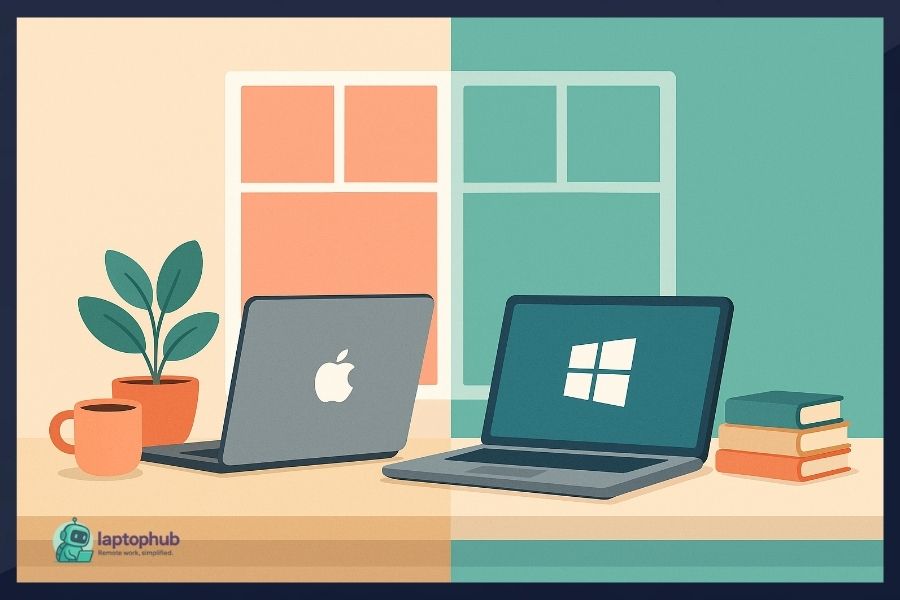
For most remote workers in 2026, a Mac is the better daily driver — it offers longer battery life, a tighter ecosystem, superior build quality, and a more reliable out-of-box experience for the tools remote professionals actually use. Windows remains the stronger choice for enterprise environments, industry-specific software, and workers who need hardware flexibility or a lower entry price. Neither platform is broken for remote work — but the one you choose has real consequences for your daily friction, security, and long-term cost of ownership.
Why Your OS Choice Matters More in a Remote-First World
When your office is wherever you open your laptop, the machine itself becomes load-bearing infrastructure. You’re not just running software — you’re depending on battery life to survive a six-hour travel day, on webcam quality to make a professional impression on client calls, on security defaults to protect data that no IT team is physically monitoring, and on ecosystem integration to keep your phone, laptop, and collaboration tools working together without constant friction. The stakes of a poor platform choice are higher when you’re working remotely, not lower.
The Mac versus Windows decision has also gotten more consequential as AI-assisted productivity tools, cloud collaboration suites, and on-device privacy requirements have all evolved significantly. What was true in 2022 — that the two platforms were converging and the gap barely mattered — is no longer fully accurate in 2026. Apple Intelligence has matured into a practical productivity layer. Microsoft Copilot is embedded across the entire Microsoft 365 suite. Hardware differences in battery efficiency, thermal management, and NPU performance now translate directly into daily work experience. By the end of this article, you’ll have a clear, honest read on which platform fits your remote work life — and why.
How Does Performance Hold Up During a Full Remote Workday?
For remote workers, performance isn’t about benchmark scores — it’s about whether your machine keeps up through eight-plus hours of real use without throttling, overheating, or requiring a power outlet every three hours.
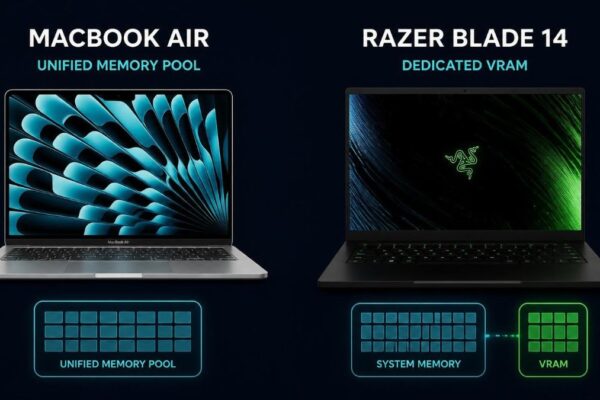
Apple Silicon — now in its fifth generation with the M5 series — continues to set the standard for sustained performance efficiency in a laptop. The M5 chip in the MacBook Air and MacBook Pro delivers desktop-class CPU speeds while consuming a fraction of the power that equivalent Intel or AMD silicon requires. The practical result: a MacBook Air M5 handles simultaneous video calls, browser-heavy research, document editing, and background app activity without fan noise, heat buildup, or visible slowdown. Battery life regularly exceeds 15 hours in mixed-use conditions — a figure that Windows laptops at comparable price points have not matched.
Windows laptops in 2026 span an enormous range. Premium configurations — the Dell XPS 13, Lenovo ThinkPad X1 Carbon Gen 13, Microsoft Surface Laptop 7, and ASUS Zenbook S 14 — are genuinely excellent machines with 10–14 hours of real-world battery life and consistent performance under load. The challenge is that Windows hardware quality is not standardized. A $1,200 Windows laptop from a less-established brand may throttle under sustained load and show battery degradation within 18 months. With macOS, the hardware and software are designed together — you get predictable performance regardless of which MacBook you buy in a given year.
For remote workers who cannot afford to be tethered to a power outlet during travel, client meetings, or coworking sessions, the battery advantage of Apple Silicon is a real daily asset, not a spec sheet talking point.
Which Platform Has Better Software for Remote Workers?
The honest answer in 2026 is that both platforms run the tools remote workers depend on, and the meaningful differences are at the margins — not in the core stack.
Tools that run identically on both platforms: Slack, Zoom, Google Meet, Microsoft Teams, Notion, Figma, VS Code, Chrome, Firefox, 1Password, Dropbox, Loom, Linear, Asana, and virtually every SaaS tool delivered through a browser. If your entire workflow lives in these applications, platform choice affects experience quality (speed, battery, interface) more than capability.
Tools that favor macOS: Final Cut Pro and Logic Pro remain macOS-exclusive and are the industry standard for video and audio production. Sketch is macOS-only. The Unix-based terminal makes macOS significantly better for developers doing web development, iOS development, or open-source work. Xcode is macOS-exclusive, making it mandatory for anyone building iOS or macOS apps.
Tools that favor Windows: Microsoft Power BI, Access, Visio, and Project remain Windows-native or Windows-optimal. Legacy enterprise software — ERP systems, industry-specific tools for engineering, accounting, legal, and healthcare — disproportionately targets Windows. IT administrators managing infrastructure through Active Directory, Group Policy, and Windows Server environments operate more naturally on Windows.
The split follows a clear pattern: creative, development, and solo professional work tilts toward Mac. Corporate, enterprise, and industry-specific work tilts toward Windows. If your role sits clearly in one camp, let that guide the decision.
How Does Each Platform Handle Team Collaboration and Cloud Tools?
Remote work is inherently collaborative, and how well your platform integrates with your team’s tools is a practical daily consideration that most platform comparisons underweight.
Microsoft 365 integration is genuinely deeper on Windows. OneDrive syncs natively into File Explorer. Teams integrates with the Windows taskbar and notification system. SharePoint and Outlook behave as first-class Windows applications with functionality that the macOS versions approximate but don’t fully replicate — particularly for organizations using advanced Teams features, SharePoint workflows, or Exchange-dependent calendar functions. If your company runs on Microsoft infrastructure and expects employees to use it fully, Windows removes friction that macOS introduces.
Google Workspace runs equally well on both platforms through the browser, with no meaningful advantage to either OS. Remote workers in Google-first organizations have no platform-specific reason to choose one over the other on collaboration grounds.
Apple ecosystem integration adds genuine value for remote workers already using iPhone. Universal Clipboard lets you copy on iPhone and paste on Mac. iPhone Mirroring — available in macOS Sequoia and later — lets you operate your iPhone directly from your Mac screen. Handoff passes tasks between devices seamlessly. For solo remote workers or small teams without standardized IT infrastructure, this integration reduces the small daily frictions that accumulate into real time loss.
[STAT: Insert percentage of remote workers using Microsoft 365 vs Google Workspace as primary collaboration suite — source: Statista or IDC Collaboration Software Report, 2025]
Which Platform Is More Secure for Remote Workers?
Security is not a secondary concern for remote workers. Without a corporate VPN, managed network, or on-site IT team, your laptop is the primary security perimeter between your work data and the open internet.
macOS has structural security advantages that stem from Apple’s control over both hardware and software. Gatekeeper prevents unsigned applications from running without explicit user approval. System Integrity Protection blocks modifications to core OS files even from administrative accounts. The Secure Enclave — a dedicated security chip in Apple Silicon — handles encryption keys, biometric data, and authentication in hardware-isolated storage. Apple’s walled garden model, often criticized as restrictive, is precisely what makes macOS a lower-attack-surface platform: fewer entry points, more controlled software distribution, and tighter hardware-software integration.
Windows has improved its security posture meaningfully in recent years. Windows Hello provides biometric authentication. BitLocker encryption is robust. Microsoft Defender has matured into a capable default antivirus. Secure Boot and TPM 2.0 are now required on all Windows 11 machines. However, Windows remains the dominant desktop operating system globally, which makes it the primary target for malware, ransomware, and phishing infrastructure. The attack surface is larger not because Windows is poorly designed, but because adversaries invest their resources where the largest user population is.
For remote workers handling sensitive client data, financial information, or regulated content without enterprise security tooling behind them, macOS offers meaningfully better default security with less configuration required.
What Does Each Platform Actually Cost Over Three to Five Years?
Purchase price is the most visible cost in this comparison and the most misleading. Total cost of ownership over the machine’s useful life tells a different story.
A MacBook Air M5 starts at $1,099. A MacBook Pro M4 Pro starts at $1,999. Both machines routinely serve remote workers for five to seven years with no meaningful performance degradation — Apple’s software updates support devices for that window, and the hardware ages gracefully because Apple Silicon was not overclocked to meet a benchmark at launch. Resale value on MacBooks is the strongest in the laptop market; a three-year-old MacBook Pro retains 50–60% of its original value in most markets.
Windows laptops offer genuine flexibility at the low end. A capable remote work machine from Lenovo, Acer, or HP can be purchased for $600–$800 — roughly half the entry price of a MacBook Air. The tradeoff is lifespan: budget Windows laptops typically show meaningful performance degradation within two to three years due to thermal design compromises and driver entropy. Premium Windows laptops (ThinkPad X1, Dell XPS, Surface Pro) compete more directly with MacBooks on longevity and build quality, but at prices that reduce the cost advantage considerably.
Over a five-year window, the total cost difference between a MacBook Air and a mid-range Windows laptop is often smaller than the sticker price gap suggests — and for remote workers who cannot afford unexpected hardware failures during a client project, the reliability premium of Apple hardware has real financial value.
How Do Built-In AI Features Compare for Remote Work in 2026?
AI-assisted productivity has moved from optional feature to daily workflow in 2026, and both platforms have embedded it at the OS level — in meaningfully different ways.
Apple Intelligence on macOS operates with a privacy-first architecture. Writing tools — rewriting, proofreading, summarizing — are available across every text field in native apps and many third-party applications. Priority notifications surface what actually needs attention. The enhanced Siri can answer questions about content on your screen, take actions across apps, and integrate with third-party applications through a new extension model. Critically, Apple Intelligence processes as much as possible on-device using the Neural Engine, and routes only tasks that exceed local capacity to Private Cloud Compute — a server infrastructure that Apple cryptographically cannot access. For remote workers handling confidential data, this privacy model is a substantive differentiator.
🖥️Also read: CUDA vs Apple Metal for Machine Learning: Which Is Better?
Microsoft Copilot embedded in Windows 11 and Microsoft 365 has the broader daily surface area for knowledge workers. Copilot in Word drafts, rewrites, and summarizes documents. Copilot in Excel generates formulas, analyzes data, and creates charts from natural language prompts. Copilot in Teams transcribes meetings, generates summaries, and drafts follow-up action items in real time. Copilot in Outlook triages email and drafts replies. For remote workers who live inside Microsoft 365 all day, this is a genuinely useful productivity layer — the AI is where you already are, not a separate tool you have to switch to.
The privacy tradeoff is real: Copilot routes significantly more data to Microsoft’s cloud infrastructure than Apple Intelligence does. For remote workers in regulated industries or those handling sensitive client information, this distinction matters and should factor into the platform decision.
FAQ: Mac vs. Windows for Remote Work
Mac is the better default choice for most independent remote workers — particularly for battery life, security, ecosystem integration, and AI-assisted productivity. Windows is the better choice for remote workers embedded in Microsoft enterprise environments or using Windows-dependent industry software.
Yes. Word, Excel, PowerPoint, Outlook, and Teams all have native macOS versions and are fully functional for most remote work scenarios. Some advanced enterprise features — particularly in SharePoint, Teams Rooms, and Exchange-dependent functions — are better supported on Windows.
For most remote workers planning to use the machine for four or more years, yes. The longer lifespan, stronger resale value, and lower likelihood of unexpected hardware failure make the total cost of ownership more competitive than the sticker price gap implies.
macOS has structurally better default security — fewer attack vectors, more controlled software installation, and hardware-level security through the Secure Enclave. On either platform, using a VPN on public networks is essential, but macOS reduces the baseline risk.
Windows Copilot has a wider daily footprint if you work inside Microsoft 365 all day — it’s embedded directly in Word, Excel, Teams, and Outlook. Apple Intelligence is more consistent across all apps but deeper in native Apple applications. Both are genuinely useful in 2026; the better one depends on which suite you already use.
For most remote workers using cloud-based tools, the transition takes one to two weeks. The main adjustment is keyboard shortcuts, file system navigation, and the absence of right-click-as-primary-interaction. The software stack (Slack, Zoom, Notion, Google Workspace, browser-based tools) transfers without friction.
Mac, primarily due to battery life. Apple Silicon MacBooks regularly deliver 15+ hours of real-world mixed use, compared to 10–13 hours on the best Windows alternatives. For travel-heavy remote workers, not needing to hunt for a power outlet during a long travel day is a meaningful quality-of-life difference.
Then Windows is your platform regardless of personal preference. Most enterprise IT departments manage Windows endpoints through Active Directory, Intune, or similar MDM systems. Some organizations support macOS through these same platforms — it’s worth asking, but don’t assume.
Bottom Line: Match the Platform to Your Work Environment
The Mac versus Windows decision for remote work in 2026 is not close in every dimension — but it is genuinely nuanced. Mac wins on battery life, security defaults, hardware reliability, ecosystem integration, and long-term value retention. Windows wins on enterprise software compatibility, hardware price flexibility, Microsoft 365 depth, and customization headroom.
The clearest decision framework: if you work independently, in a creative field, or in a Google Workspace environment, a MacBook will serve you better day-to-day with less friction and longer between replacements. If you work inside a Microsoft-standardized enterprise, use Windows-dependent industry software, or need hardware at a price point below $1,000, Windows gives you what you need without compromise.
Start with your software requirements, not your brand preference — and let that answer drive everything else.
Learn more about the best laptops for remote work in 2026 →


The remote-work comparison is especially useful because it goes beyond brand preference and considers how each platform fits modern AI-assisted workflows. I’d also weigh video-call reliability and compatibility with employer tools before making the final choice.